Lecture 01:Introduction to Data Management with SQL
DATA 351: Data Management with SQL
January 12, 2026
Motivations
Data Science and Data
Data science is fundamentally tied to the data that it analyzes.
Before any analysis can be done, we need to know:
- In what way we want to store the data
- How we want to organize the data with that storage
- How we can easily retrieve the desired data when we need it
Requirements for Data Storage
All data storage solutions need to be:
- Reliable
- If a hard drive goes corrupt, we cannot just lose all of our data.
- Scalable
- We may need ways for thousands of individuals across the world to access at the same time.
- Maintainable
- The needs of an organization or the data itself can shift over time. The storage needs to be flexible enough to handle these shifts.
This is the work of a data engineer.
Why a Database?
Data Storage Options
There are many different ways information can be stored, with varying trade-offs.
Suppose you wanted to keep track of your friends’ birthdays:

| First Name | Last Name | Birthday |
|---|---|---|
| Eleven | Hopper | 4/2/2004 |
| Dustin | Henderson | 8/23/2003 |
| Max | Mayfield | 12/14/2005 |
Option 1: Tables (CSV)
You could store the information in a table or comma-separated values (CSV) file:
| First Name | Last Name | Birthday |
|---|---|---|
| Eleven | Hopper | 4/2/2004 |
| Dustin | Henderson | 8/23/2003 |
| Max | Mayfield | 12/14/2005 |
Option 2: JSON
Alternatively, you might use some other form of common data structure like JSON:
The Plot Thickens
Suppose now you would also like to keep track of what courses they are currently taking at Hawkins High, and what times those courses are held.
Suppose each friend is taking 2-3 classes, some of which overlap.
This significantly complicates both storage methods.
Table Storage Problem
We cannot store tables inside of tables, so we usually need to duplicate information over multiple rows:
| First Name | Last Name | Birthday | Class | Day | Time |
|---|---|---|---|---|---|
| Eleven | Hopper | 4/2/2004 | CHEM101 | MWF | 1:00pm |
| Eleven | Hopper | 4/2/2004 | AV101 | MWF | 9:00am |
| Dustin | Henderson | 8/23/2003 | CHEM101 | MWF | 1:00pm |
| Dustin | Henderson | 8/23/2003 | PHYS201 | TTh | 1:00pm |
Duplication is generally bad!
JSON Storage Problem
We still have duplication issues with JSON as well:
[
  {"First Name": "Eleven", "Last Name": "Hopper",
   "Birthday": "4/2/2004",
   "Classes": [
     {"class": "CHEM101", "day": "MWF", "time":"1:00pm"},
     {"class": "AV101", "day": "MWF", "time":"9:00am"}
   ]},
  {"First Name": "Dustin", "Last Name": "Henderson",
   "Birthday": "8/23/2003",
   "Classes": [
     {"class": "CHEM101", "day": "MWF", "time":"1:00pm"},
     {"class": "PHYS201", "day": "TTh", "time":"1:00pm"}
   ]}
]
Class information like day and time is duplicated across friends.
Relational Databases
The Relational Solution
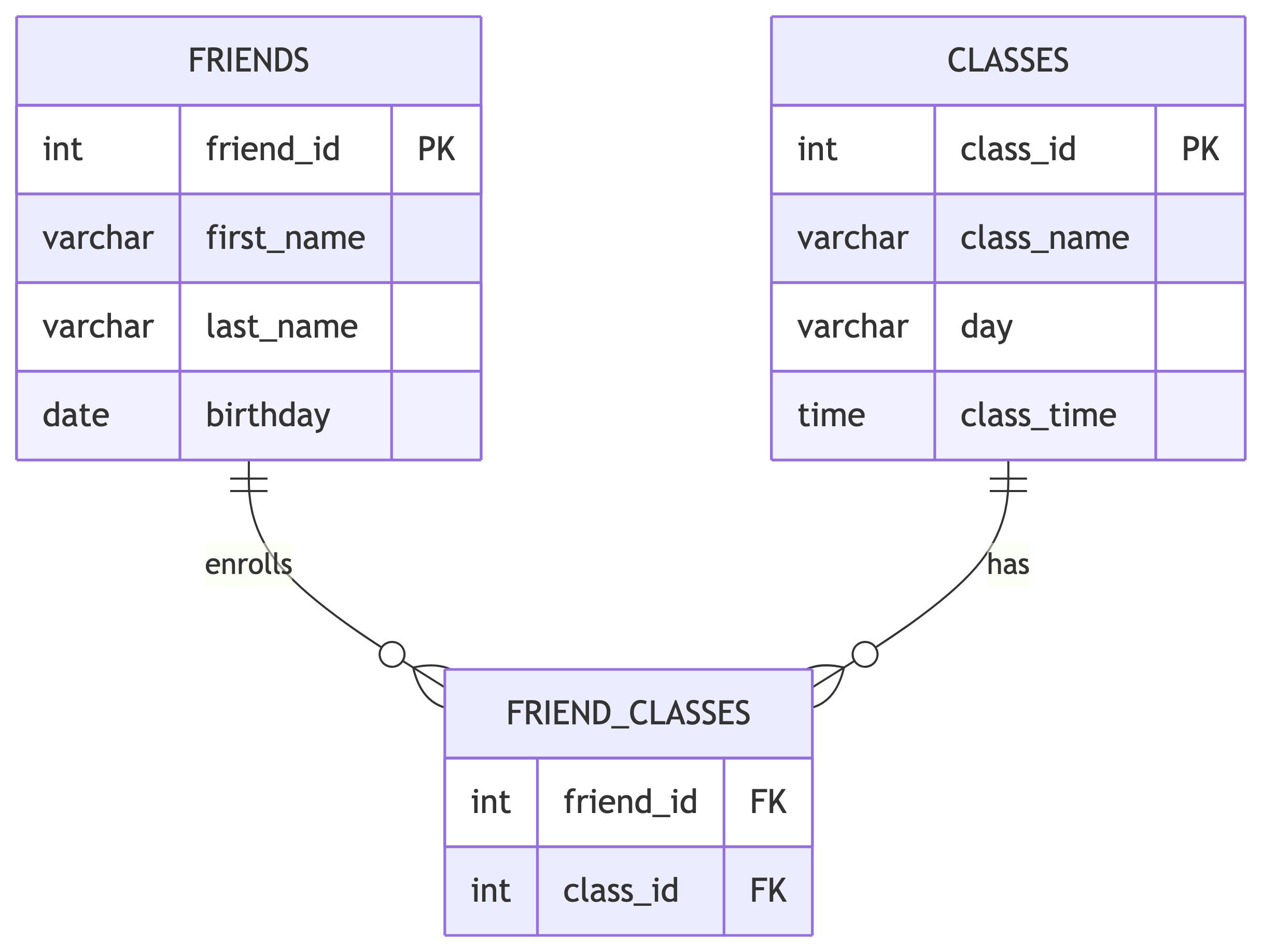
One solution is realizing that we are trying to actually keep track of two things: friends and classes.
So we break things up into two tables, and then create relationships between them.
This is the core of what occurs in a relational database.
Separate Tables
Friends Table:
| First Name | Last Name | Birthday |
|---|---|---|
| Eleven | Hopper | 4/2/2004 |
| Dustin | Henderson | 8/23/2003 |
| Max | Mayfield | 12/14/2005 |
Classes Table:
| Class | Day | Time |
|---|---|---|
| CHEM101 | MWF | 1:00pm |
| AV101 | MWF | 9:00am |
| PHYS201 | TTh | 1:00pm |
| HIST150 | MWF | 12:00pm |
Linking Tables with Relationships
In general, you would use a third table to represent all the linkages.
Unique ID keys are used to connect the different tables.
Benefits of Relational Databases
- No duplication: Each piece of information is stored once
- Data integrity: Changes only need to be made in one place
- Flexibility: Easy to add new relationships without restructuring
- Efficient queries: Can retrieve complex related data quickly
Quick Note on Data Types
In a relational database we can specify what type of information is allowed in each column:
intfor integersvarcharfor textdatefor datestimefor timesbooleanfor true/false valuesnumericfor decimal numbers
This keeps information consistent and predictable.
SQL Overview
What is SQL?
SQL is a language that allows you to define and query relational databases.
Pronunciation:
- Modern: “ESS-CUE-ELL”
- Historical: “SEQUEL” (Structured English Query Language, renamed due to trademark issues)
SQL is often called “Structured Query Language,” but the name is misleading:
- Not “structured”: SQL is declarative (you say what you want, not how to get it)
- Not just “query”: SQL also creates tables, inserts data, and manages permissions
- Not a full “language”: Standard SQL is not Turing complete
SQL Variants
SQL comes in several variants, though the core standards are governed by ANSI and ISO, so none stray too far from the standards.
Common SQL variants include:
- PostgreSQL (our focus this semester)
- MySQL / MariaDB
- SQLite
- Microsoft SQL Server
- Oracle Database
Skills transfer easily between variants.
PostgreSQL Basics
SQL Servers
PostgreSQL operates on a server model where clients contact the server and ask it to manipulate or query a particular database.
- Multiple databases can exist on the server at a time
- Works well for large distributions
- You can also run a local server on your computer
Interacting with PostgreSQL
Several ways you can interact with the server:
- Terminal prompt (psql command line)
- pgAdmin (as detailed in the textbook)
- Beekeeper Studio (Community Edition)
We will use Beekeeper Studio or pgAdmin in this course.
Creating a New Database
SQL has commands to help with administration as well as creating, manipulating, and querying tables.
New installs come with a database called postgres, but it is good practice to create a new one and leave the default untouched.
Creating a New Table
Creating tables is one of the more fundamental actions you may need to take with a database.
Need to specify:
- The name of the table
- The names of the columns and their data types
SQL Syntax Conventions
SQL requires no special formatting for capitalization or tabbing, but conventions help readability:
- Use UPPERCASE for SQL keywords
- Use lowercase and underscores for table or column names
- Indent clauses and blocks of code for readability
- A semicolon indicates the end of a command
- Text and dates need single quotes, numbers do not
Example: Creating a Friends Table
Adding Values to a Table
Tables are initially empty. You add data by inserting new values into the columns.
New rows are concatenated to the end of the table.
Querying Data
Once data is in the table, you can retrieve it using SELECT:
| first_name | last_name | birthday |
|---|---|---|
| Eleven | Hopper | 2004-04-02 |
| Dustin | Henderson | 2003-08-23 |
| Max | Mayfield | 2005-12-14 |
Summary
Key Takeaways
Data Management Fundamentals:
- Data storage must be reliable, scalable, and maintainable
- Flat files (CSV, JSON) lead to data duplication problems
- Relational databases solve duplication through linked tables
SQL Basics:
- SQL is the language for defining and querying relational databases
- PostgreSQL is our SQL variant of choice
- Tables have columns with defined data types
- Data is added with INSERT and retrieved with SELECT
What is Next
Reading: Chapter 1 and Chapter 2 of Practical SQL
Topics:
- Setting up your PostgreSQL environment
- Using SELECT to query data
- Filtering and sorting results