
Lecture 09: Inspecting and Modifying Data
DATA 351: Data Management with SQL
February 25, 2026
Learning Objectives
What You Will Be Able to Do
By the end of this lesson, you will be able to:
- Identify (Remember) common data quality issues: duplicates, NULLs, inconsistencies, and typos in a staging table
- Analyze (Analyze) raw data using GROUP BY, count(), length(), and WHERE to find anomalies
- Apply (Apply) UPDATE, ALTER TABLE ADD/DROP COLUMN, and DELETE to fix data quality issues
- Create (Apply) backup copies of tables and temporary columns as safety nets before modifying data
- Evaluate (Evaluate) when to use transactions (START TRANSACTION, COMMIT, ROLLBACK) to protect against mistakes
- Construct (Create) a multi-step data cleaning workflow that prepares staging data for migration into normalized tables
The Big Picture
Where We Are
Last time we built tables with constraints. Now we clean the data that goes into them.
This is the step most people skip and then regret. Constraints will reject dirty data at the door, so we need to clean it first.
Today’s Agenda
We are data janitors today. No cap, this is 80% of real data work:
- Setting up exercise data
- Finding duplicates, NULLs, inconsistencies, and typos
- Backup strategies (because mistakes happen)
- UPDATE for fixing data
- ALTER TABLE for temporary columns
- DELETE for removing bad rows
- Transactions for safety
- Preparing data for migration
Setting Up the Exercise Data
Creating the Database
Open Beekeeper Studio or pgAdmin and run:
Then connect to the lc_music database before running the next step.
Loading the Script
- Download
music_staging_setup.sqlfrom the course site - Open it in Beekeeper or pgAdmin (connected to
lc_music) - Select all (Ctrl+A) and execute (Ctrl+Enter in Beekeeper, or click Execute in pgAdmin)
The script creates:
music_catalog_staging– our messy raw data (40+ rows of chaos)artists,albums,tracks– our clean normalized target tables (empty, waiting)
Verify the Setup
You should see 40 rows. If you see 0, you did not run the INSERT statements. If you see 80, you ran the script twice. Either way, drop and re-run.
Take a look. Notice anything suspicious? We are about to find out.
Phase 1: Inspecting the Data
The Inspection Mindset
Before you fix anything, you need to understand what is broken. Think of it like a doctor’s exam before surgery. Every good data cleaning workflow starts with questions:
- How many rows do we have?
- Are there duplicates?
- Are there NULL values?
- Is the casing consistent?
- Are there typos?
- Are values in valid ranges?
- Do categorical values match?
- Are related fields consistent?
Finding Duplicates
The most common data quality issue. Let us check for duplicate catalog IDs:
CAT-1001 appears twice – an exact duplicate row. But duplicates are not always that obvious.
Sneaky Duplicates
Sometimes the catalog_id is different but the data is the same:
The Beatles’ “Come Together” appears with both CAT-1010 and CAT-1099. Same song, different ID. This is real-world data distribution drama.
Knowledge Check 1
True or False: If every row has a unique catalog_id, then the table has no duplicates.
Think about it.
Answer: Knowledge Check 1
False!
Duplicate data can exist even with unique IDs. A duplicate is about the content, not just the identifier. Always check for duplicates on the meaningful columns, not just the ID.
Finding NULL Values
NULLs are the ghosts of your database – invisible until they break something:
SELECT
    count(*) AS total_rows,
    count(*) - count(genre) AS missing_genre,
    count(*) - count(label) AS missing_label,
    count(*) - count(track_title) AS missing_track_title,
    count(*) - count(track_number) AS missing_track_number,
    count(*) - count(track_duration_sec) AS missing_track_duration
FROM music_catalog_staging;
count(column) skips NULLs while count(*) counts all rows. The difference reveals the gaps.
Which Rows Have NULLs?
Daft Punk is missing genre and label info. Amy Winehouse has a NULL track. These need decisions: fill them in, or remove them?
Inconsistent Casing
This is low-key the most annoying data problem:
You will see entries like:
BeyoncevsBEYONCEthe rolling stonesvsThe Rolling StonesvsTHE ROLLING STONESTaylor SwiftvsTaylor swiftkendrick lamarvsKendrick Lamar
Same artist, different vibes. The database treats them as completely different values.
Inconsistent Genre and Label
It is not just artist names. Check genres:
Hip-Hop vs hip-hop, Alternative vs alternative, Pop vs pop. Same energy, different casing.
Labels too:
LaFace vs Laface Records, Capitol vs Capitol Records, TDE vs Top Dawg Entertainment. Absolute chaos.
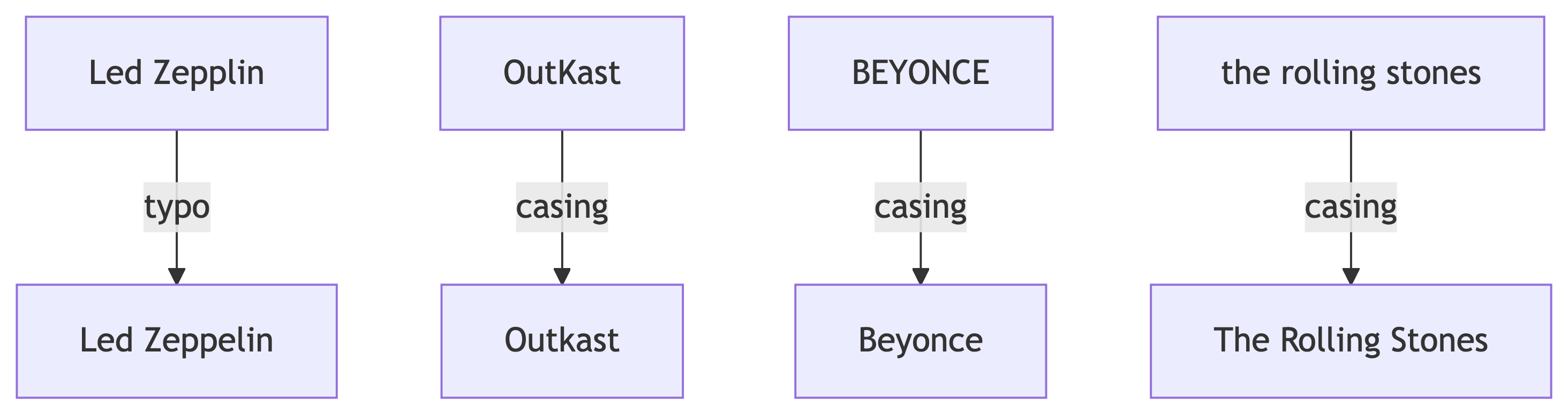
Finding Typos
Validating Numeric Ranges
Check for values that are clearly wrong:
Nirvana with release_year = 9119? Grunge was ahead of its time, but not that far ahead.
Pink Floyd with duration_min = -42.5. Albums cannot have negative runtime. Not even conceptually.
Knowledge Check 2
Which SQL function helps you find rows where zip codes or text fields have unexpected lengths?
count()length()trim()upper()
Answer: Knowledge Check 2
B) length()
The length() function returns the number of characters in a string. Useful for spotting truncated data, padded values, or fields that are suspiciously short or long.
Data Quality Summary
Here is what we found:
| Issue | Count |
|---|---|
| Duplicate catalog_id | 1 row |
| Sneaky content duplicates | 1 row |
| NULL genre | 2 rows |
| NULL label | 1 row |
| NULL track info | 1 row |
| Inconsistent casing | 10+ rows |
| Typos | 2+ rows |
| Bad release year | 1 row |
| Negative duration | 1 row |
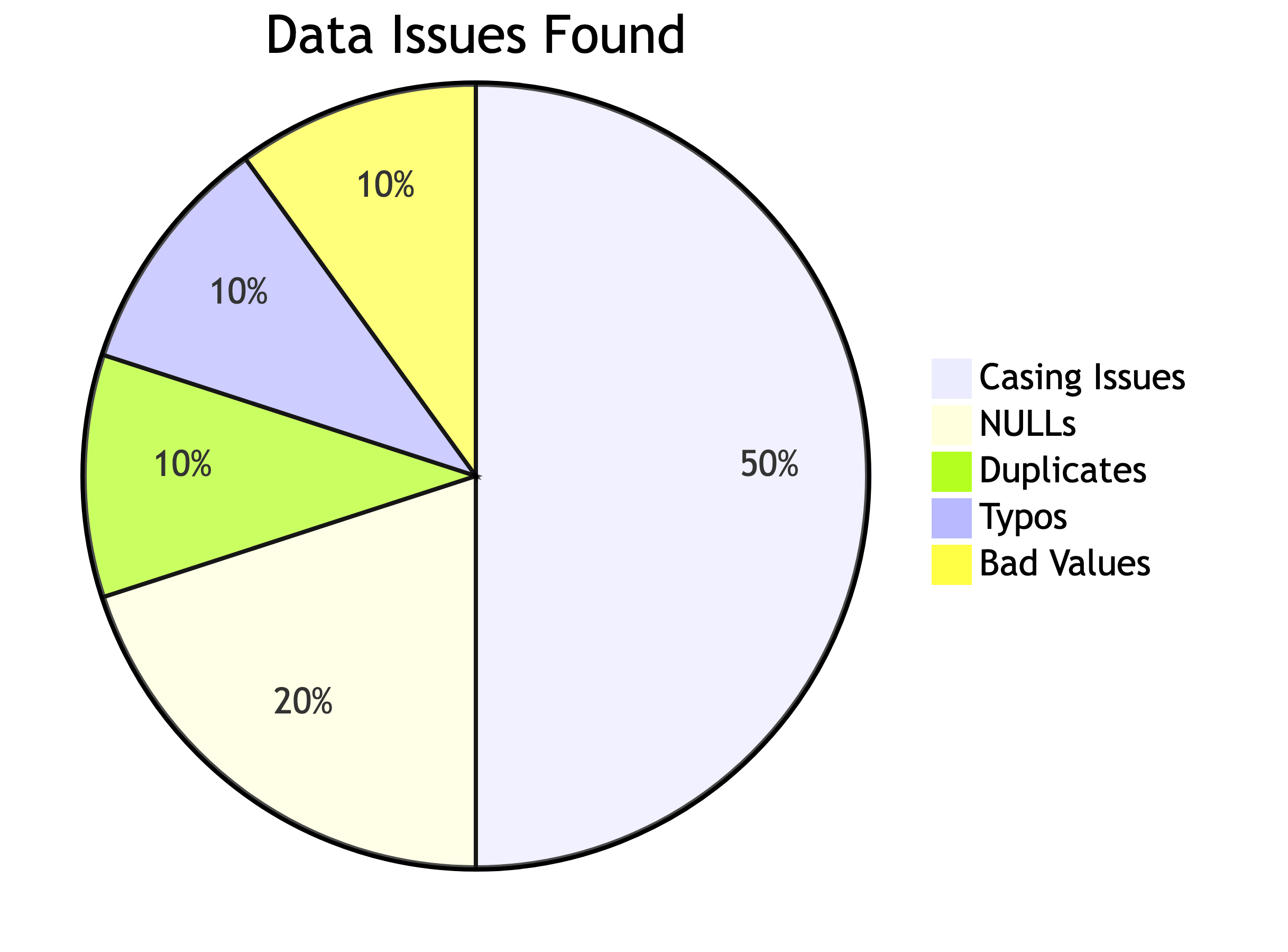
That is a lot of mess for 40 rows. Imagine a dataset with 6 million. This is why inspection matters.
Phase 2: Safety First – Backups
Why Backups Before Changes
We are about to start modifying data. Before you UPDATE or DELETE anything, make a backup. This is non-negotiable. It is the database equivalent of saving your game before the boss fight.
Creating a Table Backup
This creates an exact copy. Verify it:
Both should show 40. If they match, you are safe to proceed.
Using Temporary Columns
Instead of modifying a column directly, create a copy first:
Now you can modify artist_name_clean while keeping the original artist_name intact. If you mess up, you still have the original.
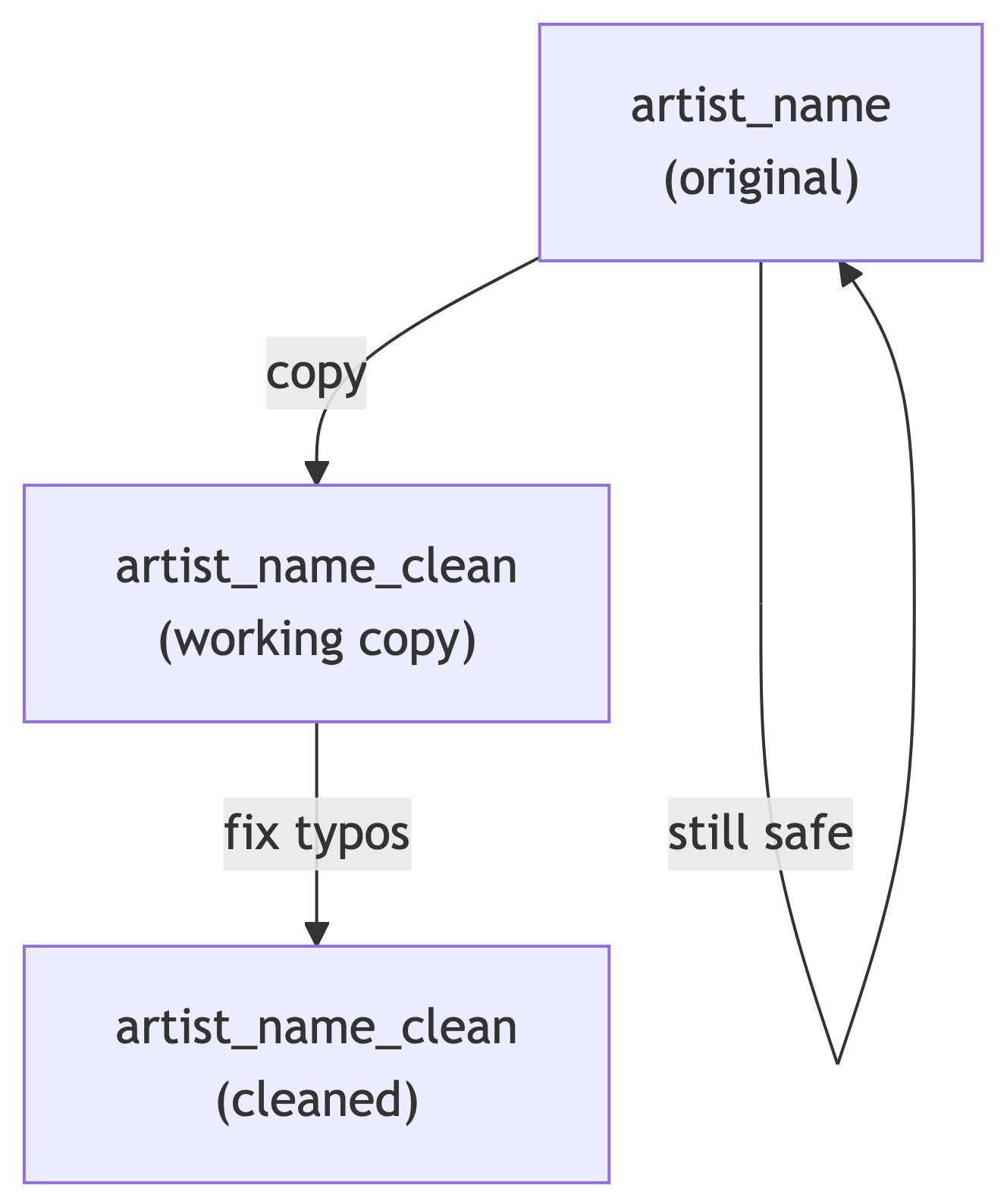
The Safety Pattern
Every modification should follow this pattern:

This is not paranoia. This is professionalism.
Knowledge Check 3
You need to fix typos in the artist_name column. What should you do FIRST?
Run UPDATE directly on
artist_nameCreate a backup copy of the table
Delete all the bad rows
Drop the column and recreate it
Answer: Knowledge Check 3
B) Create a backup copy of the table
Always create a backup before modifying data. If your UPDATE goes wrong (and it will, eventually), you want a way to restore the original. No backup = no undo = no sleep tonight.
Phase 3: Fixing the Data
The UPDATE Statement
UPDATE modifies existing rows. The basic syntax:
The WHERE clause is critical. Without it, every row gets updated. That is almost never what you want.
Fixing Inconsistent Artist Casing
Let us standardize artist names. First, add and populate our working column:
Now fix the casing issues one artist at a time:
UPDATE music_catalog_staging
SET artist_name_clean = 'Beyonce'
WHERE lower(artist_name) = 'beyonce';

UPDATE music_catalog_staging
SET artist_name_clean = 'The Rolling Stones'
WHERE lower(artist_name) = 'the rolling stones';

UPDATE music_catalog_staging
SET artist_name_clean = 'Taylor Swift'
WHERE lower(artist_name) = 'taylor swift';

UPDATE music_catalog_staging
SET artist_name_clean = 'Kendrick Lamar'
WHERE lower(artist_name) = 'kendrick lamar';

UPDATE music_catalog_staging
SET artist_name_clean = 'Outkast'
WHERE lower(artist_name) = 'outkast';
Fixing Typos
The Led Zepplin typo needs a targeted fix:
Verify it:
Every artist should now have a single clean name in artist_name_clean.
Fixing Inconsistent Genres
Same pattern – add a clean column, then standardize:
initcap() capitalizes the first letter of each word. But check the results:
Hip-Hop becomes Hip-Hop (correct). alternative becomes Alternative (correct). R&B becomes… R&b. Not ideal. Fix it:
Fixing Inconsistent Labels
Labels have variations like LaFace vs Laface Records and TDE vs Top Dawg Entertainment:
ALTER TABLE music_catalog_staging
    ADD COLUMN label_clean varchar(100);

UPDATE music_catalog_staging
SET label_clean = label;

UPDATE music_catalog_staging
SET label_clean = 'LaFace Records'
WHERE label_clean LIKE 'LaFace%'
   OR label_clean LIKE 'Laface%';

UPDATE music_catalog_staging
SET label_clean = 'Capitol Records'
WHERE label_clean LIKE 'Capitol%';

UPDATE music_catalog_staging
SET label_clean = 'Big Machine Records'
WHERE label_clean LIKE 'Big Machine%';

UPDATE music_catalog_staging
SET label_clean = 'Top Dawg Entertainment'
WHERE label_clean IN ('TDE', 'Top Dawg Entertainment');

UPDATE music_catalog_staging
SET label_clean = 'Rolling Stones Records'
WHERE label_clean LIKE 'Rolling Stones%';
Knowledge Check 4
What does this query do?
Capitalizes every letter in the genre
Lowercases the entire genre
Capitalizes the first letter of each word
Removes all spaces from the genre
Answer: Knowledge Check 4
C) Capitalizes the first letter of each word
initcap('hip-hop') returns 'Hip-Hop'. It is PostgreSQL’s built-in title-case function. Super useful for standardizing casing, but watch out for edge cases like R&B.
Fixing Bad Numeric Values
The Nirvana release year 9119 should be 1991:
The Pink Floyd negative duration:
Always use the most specific WHERE clause possible. Using catalog_id targets exactly one row, which is what we want.
Filling NULL Values
Daft Punk’s genre is Electronic. We know this, so we fill it in:
The missing label:
Using UPDATE with Concatenation
The textbook shows a useful pattern for fixing padded or truncated values using the concatenation operator ||:
The || operator glues strings together. 'abc' || '123' gives 'abc123'. Useful for building composite values or fixing formatting issues.
Phase 4: Removing Bad Rows
DELETE FROM
DELETE removes rows. Like UPDATE, it needs a WHERE clause unless you want to nuke everything:
Removing Exact Duplicates
Remember our duplicate CAT-1001? We need to remove one copy. PostgreSQL has a hidden column called ctid (the physical row location) that helps:
This keeps the first occurrence of each unique combination and deletes the rest.
Removing Content Duplicates
The Beatles’ “Come Together” exists with two different catalog IDs. Keep one, remove the other:
Handling the Amy Winehouse NULL Row
The row with NULL track info is incomplete. Depending on your business rules, you might:
For our exercise, let us delete it since we need track info for our normalized tables:
Verify After Deletion
We started with 40 rows. After removing 1 exact duplicate, 1 content duplicate, and 1 NULL track row, we should have 37 rows.
Knowledge Check 5
What happens if you run DELETE FROM music_catalog_staging; without a WHERE clause?
It deletes the table structure and all data
It deletes all rows but keeps the table structure
It raises an error because WHERE is required
It deletes only NULL rows
Answer: Knowledge Check 5
B) It deletes all rows but keeps the table structure
DELETE FROM without WHERE removes every row but the table still exists (empty). If you want to remove the table entirely, that is DROP TABLE. Big difference. One empties the house, the other demolishes it.
Phase 5: Transactions
Why Transactions Matter
Every UPDATE and DELETE is permanent by default. Transactions let you preview changes before committing them.
Think of it like trying on clothes before buying. You can put them back if they do not fit.
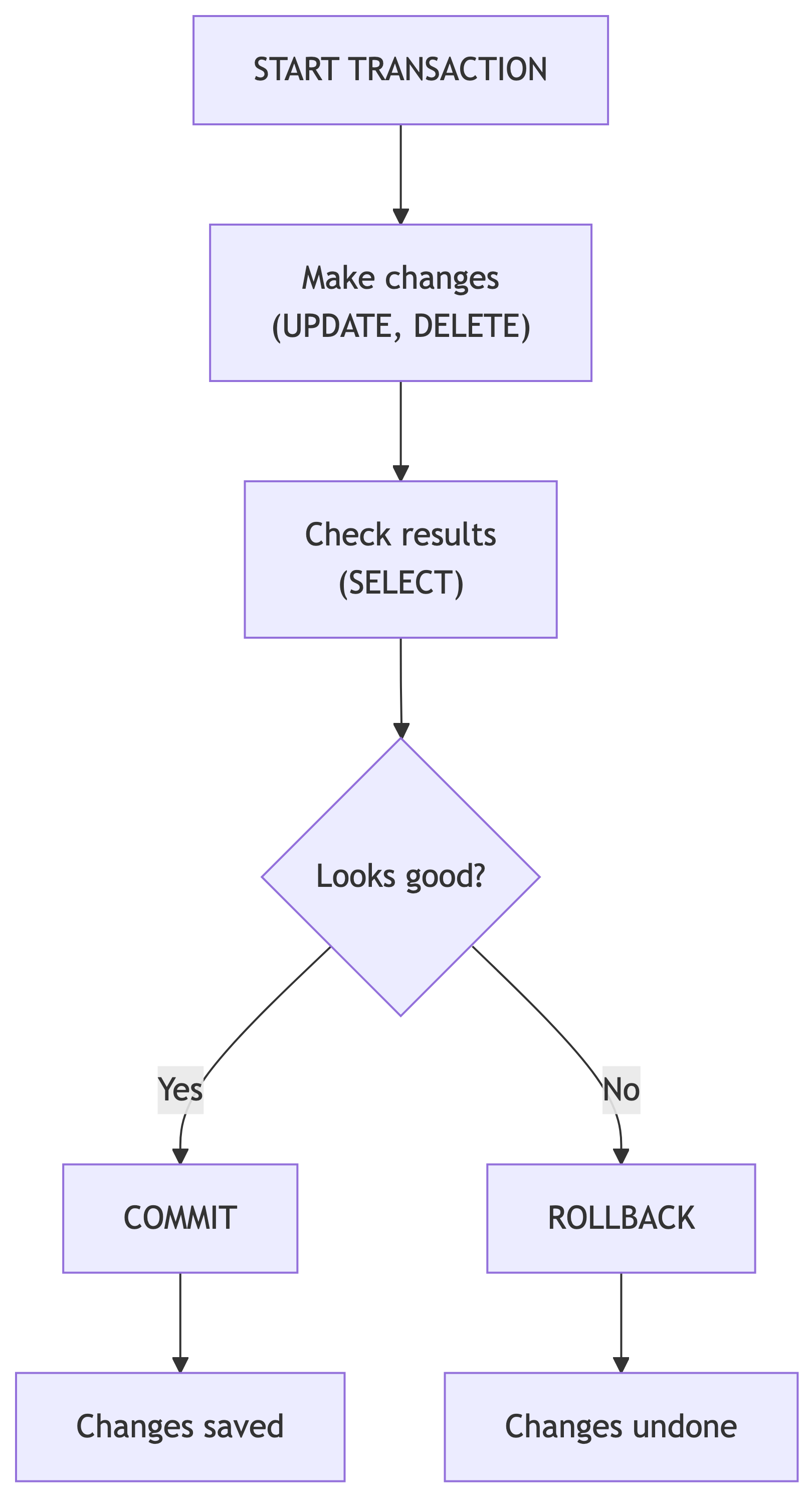
Transaction Syntax
After ROLLBACK, the data is exactly as it was before START TRANSACTION. Crisis averted.
COMMIT: Making It Permanent
If the changes look correct, use COMMIT:
After COMMIT, the changes are permanent. No going back (unless you have that backup table we made earlier).
When to Use Transactions
| Use a Transaction | Skip Transaction |
|---|---|
| Bulk UPDATEs on many rows | Single-row changes with backup |
| Any DELETE operation | SELECT queries (read-only) |
| Multi-step changes that must succeed together | Adding columns (ALTER TABLE) |
| When you are not 100% sure about the WHERE clause | When you have a backup and are confident |
Pro tip: if you are asking yourself “should I use a transaction?” the answer is yes.
Knowledge Check 6
You ran START TRANSACTION, then an UPDATE that changed 500 rows incorrectly. What command undoes the damage?
UNDO;REVERT;ROLLBACK;CTRL+Z;
Answer: Knowledge Check 6
C) ROLLBACK;
ROLLBACK reverses all changes made since START TRANSACTION. There is no UNDO or CTRL+Z in SQL. And CTRL+Z only works in your text editor, not on your data.
Phase 6: Cleanup and Preparation
Dropping Temporary Columns
Once you have verified your clean columns are correct, you can either:
- Drop the old columns and rename the clean ones
- Keep both for reference
-- Drop the original messy columns
ALTER TABLE music_catalog_staging DROP COLUMN artist_name;
ALTER TABLE music_catalog_staging DROP COLUMN genre;
ALTER TABLE music_catalog_staging DROP COLUMN label;

-- Rename clean columns to the standard names
ALTER TABLE music_catalog_staging
    RENAME COLUMN artist_name_clean TO artist_name;
ALTER TABLE music_catalog_staging
    RENAME COLUMN genre_clean TO genre;
ALTER TABLE music_catalog_staging
    RENAME COLUMN label_clean TO label;
Dropping the Backup Table
Once you are confident in your cleaned data and have migrated it to the normalized tables, you can remove the backup:
Only do this when you are truly done. There is no recovering a dropped table (unless you have database-level backups, which you should in production).
The Table Swap Trick
The textbook shows a clever pattern for replacing a table with an updated version:
-- Create an improved copy with an extra column
CREATE TABLE music_catalog_staging_v2 AS
SELECT *,
       now()::date AS cleaned_date
FROM music_catalog_staging;

-- Swap the tables using rename
ALTER TABLE music_catalog_staging
    RENAME TO music_catalog_staging_old;
ALTER TABLE music_catalog_staging_v2
    RENAME TO music_catalog_staging;
ALTER TABLE music_catalog_staging_old
    RENAME TO music_catalog_staging_backup;
This adds a cleaned_date column and swaps the tables without downtime. The old version becomes the new backup.
Knowledge Check 7
What is the difference between DELETE FROM table_name; and DROP TABLE table_name;?
Think about what survives each command.
Answer: Knowledge Check 7
DELETE FROM table_name;removes all rows but the table structure (columns, constraints, indexes) still exists. You can INSERT new data immediately.DROP TABLE table_name;removes the table entirely – structure, data, constraints, indexes, everything. Gone. Reduced to atoms.
One is emptying a filing cabinet. The other is throwing the filing cabinet in a dumpster.
Phase 7: The Full Cleaning Workflow
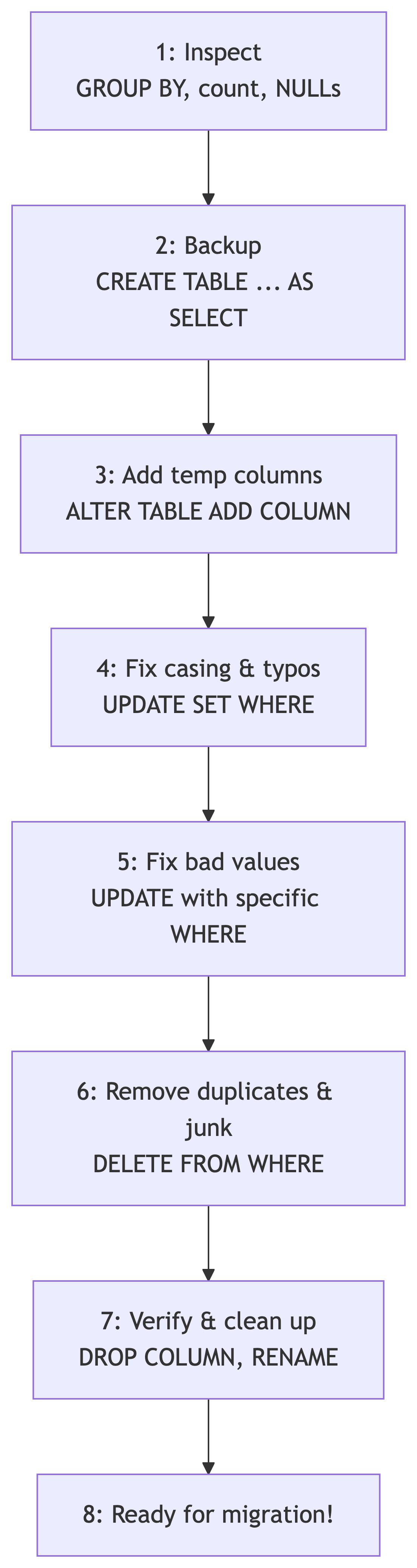
Summary: Our Data Cleaning Pipeline
Key SQL Commands Cheat Sheet
Inspection:
| Task | SQL |
|---|---|
| Count rows | count(*) |
| Find dupes | GROUP BY ... HAVING count(*) > 1 |
| Find NULLs | WHERE col IS NULL |
| Check lengths | length(col) |
| Distinct values | SELECT DISTINCT col |
Modification:
| Task | SQL |
|---|---|
| Update data | UPDATE SET WHERE |
| Add column | ALTER TABLE ADD COLUMN |
| Drop column | ALTER TABLE DROP COLUMN |
| Rename column | ALTER TABLE RENAME COLUMN |
| Delete rows | DELETE FROM WHERE |
| Drop table | DROP TABLE |
Key SQL Commands Cheat Sheet (cont.)
Safety:
| Task | SQL |
|---|---|
| Backup table | CREATE TABLE backup AS SELECT * FROM original |
| Start transaction | START TRANSACTION; |
| Save changes | COMMIT; |
| Undo changes | ROLLBACK; |
| Title case | initcap(col) |
| Concatenate | col1 \|\| col2 |
| Lowercase | lower(col) |
Knowledge Check 8 (Open Answer)
You receive a CSV with 50,000 rows of customer data. Before loading it into your production tables, describe the first five things you would do to inspect and prepare the data. Use what we learned today.
Take 2 minutes. Write it down. Compare with a neighbor.
Sample Answer: Knowledge Check 8
- Import into a staging table (no constraints yet)
- Count rows to verify the full file loaded
- Check for duplicates using GROUP BY + HAVING on key columns
- Check for NULLs in required fields using count(*) - count(col)
- Check for inconsistencies in categorical columns (casing, typos) using DISTINCT and GROUP BY
Then: backup, fix, verify, migrate. In that order. Always.
What Is Next
Coming Up
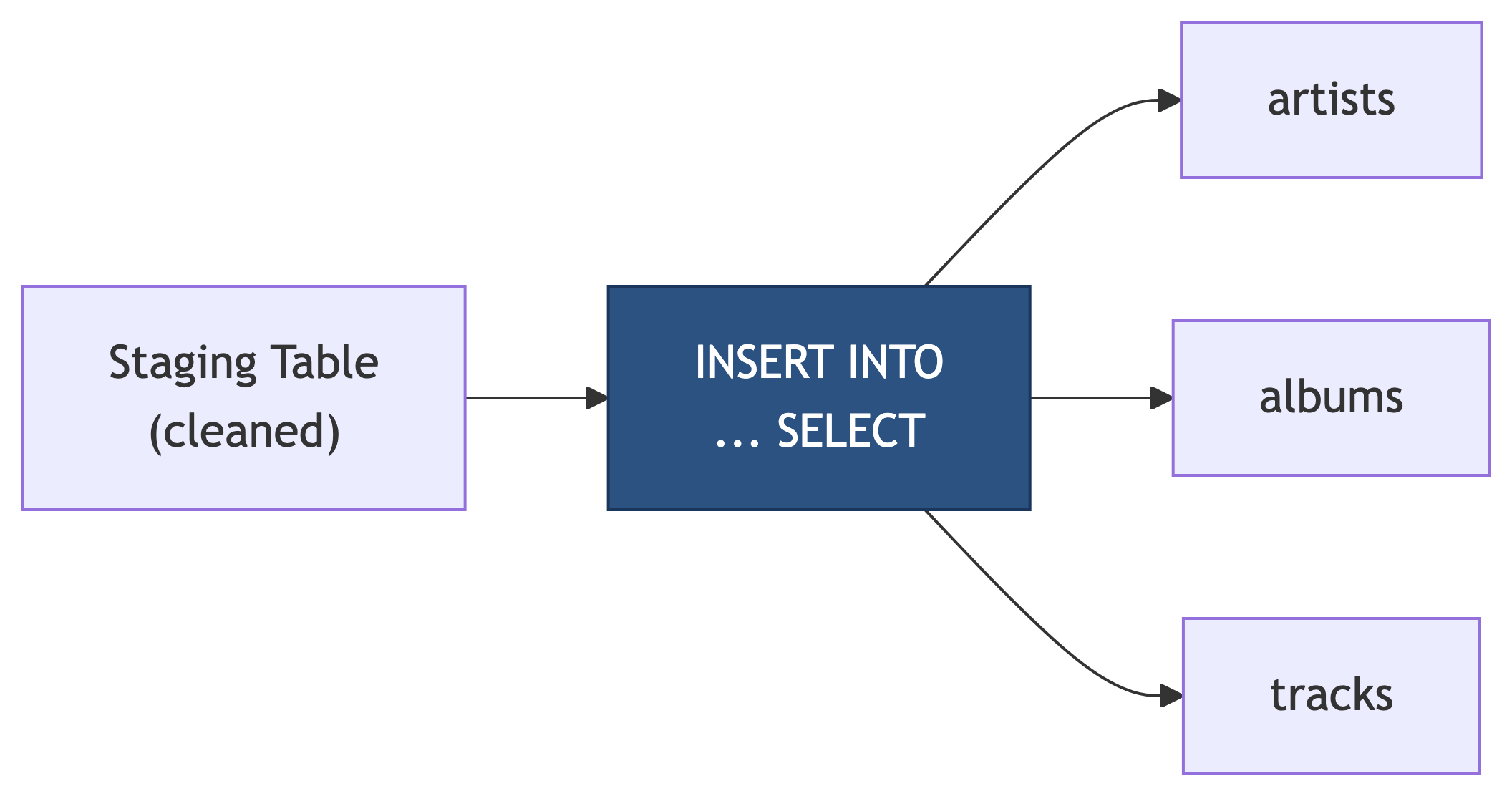
Now that we can inspect and clean staging data, next time we will:
- Use
INSERT INTO ... SELECTto migrate cleaned data into normalized tables - Handle the artist/album/track relationships during migration
- Verify referential integrity after migration
- Celebrate with clean, normalized data
References
Sources
DeBarros, A. (2022). Practical SQL: A Beginner’s Guide to Storytelling with Data (2nd ed.). No Starch Press. Chapter 9: Inspecting and Modifying Data.
PostgreSQL Documentation. “UPDATE.” https://www.postgresql.org/docs/current/sql-update.html
PostgreSQL Documentation. “ALTER TABLE.” https://www.postgresql.org/docs/current/sql-altertable.html
PostgreSQL Documentation. “Transactions.” https://www.postgresql.org/docs/current/tutorial-transactions.html