
Lecture 10: Modifying Data and Migrating Tables
DATA 351: Data Management with SQL
March 10, 2026
Learning Objectives
What You Will Be Able to Do
By the end of this lesson, you will be able to:
- Recall (Remember) the syntax and purpose of ALTER TABLE, UPDATE, DELETE, and transactions
- Identify (Analyze) data quality issues by interviewing a dataset using GROUP BY, count(), length(), and IS NULL
- Apply (Apply) UPDATE with WHERE, ALTER TABLE ADD/DROP COLUMN, and DELETE to fix data quality problems
- Use (Apply) transactions (START TRANSACTION, COMMIT, ROLLBACK) to safely preview and revert changes
- Use (Apply) the RETURNING clause to verify modifications without a separate SELECT
- Construct (Create) INSERT INTO … SELECT statements to migrate cleaned staging data into normalized 3NF tables
- Produce (Create) a complete SQL cleanup and migration script from a messy staging table
The Big Picture
Where We Are
We have covered inspecting data. Now we apply the full pipeline: clean, modify, and migrate.
Last time we were the data doctors running diagnostics. Today we are the surgeons. Scrub in.
Today’s Agenda
Two hours, seven phases, one deliverable. No bathroom breaks. (Kidding. Mostly.)
- Phase 1: Setup and orientation (the messy data and the clean target)
- Phase 2: Interviewing the dataset (inspection review)
- Phase 3: Safety first (backups and column copies)
- Phase 4: Cleaning with UPDATE
- Phase 5: Removing bad rows with DELETE
- Phase 6: Transactions for safe surgery
- Phase 7: Migrating cleaned data into normalized tables
What you turn in: A single SQL file with all your cleanup and migration statements.
The Deliverable
By the end of class you will submit a SQL file called cleanup.sql that contains:
- Your backup statement
- All UPDATE statements that fix the data
- All DELETE statements that remove bad rows
- Column cleanup (DROP/RENAME) statements
- INSERT INTO … SELECT migration statements
- Verification queries
Start a new file now in Beekeeper or your text editor. Add your name at the top as a comment.
Phase 1: Setup and Orientation
Creating the Database
If you still have lc_music from last time, drop it and start fresh:
Connect to lc_music, then run the setup script music_genz_setup.sql from the course site.
What the Script Creates
The script creates four tables:
| Table | Purpose | Rows |
|---|---|---|
music_catalog_staging |
Raw messy data | 48 |
artists |
Normalized target (empty) | 0 |
albums |
Normalized target (empty) | 0 |
tracks |
Normalized target (empty) | 0 |
Verify:
The Staging Table Schema
| Column | Type |
|---|---|
| catalog_id | varchar(20) |
| artist_name | varchar(200) |
| album_title | varchar(200) |
| release_year | smallint |
| genre | varchar(50) |
| label | varchar(100) |
| duration_min | numeric(5,1) |
| track_title | varchar(200) |
| track_number | smallint |
| track_duration_sec | numeric(6,1) |
One flat table. No constraints. No keys. Just raw imported data. A crime scene, basically.
The Target: 3NF Normalized Design
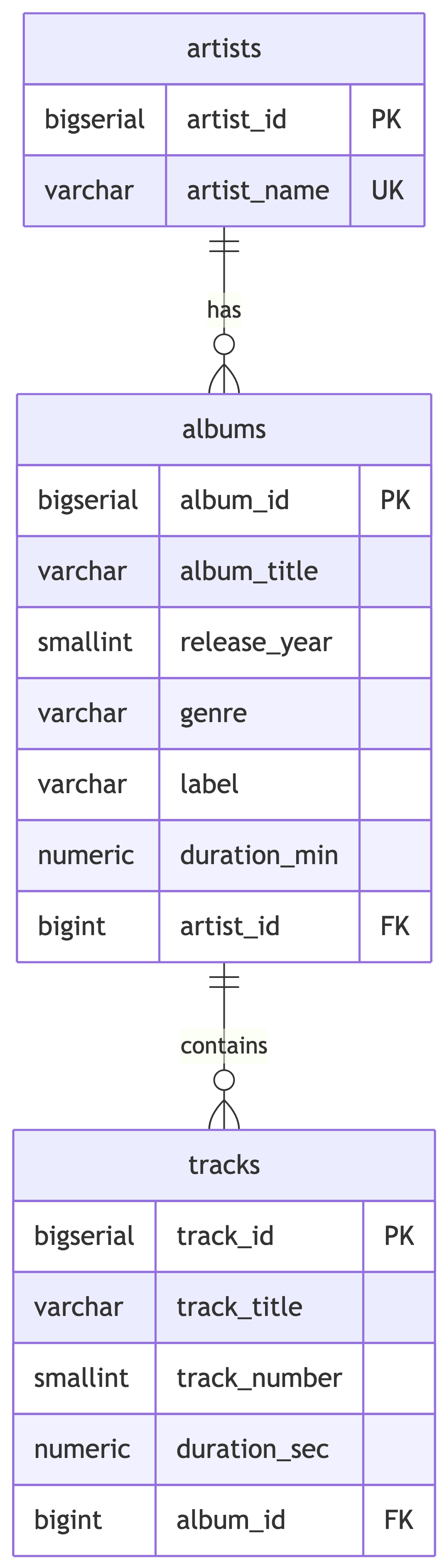
The target tables have constraints: CHECK on year ranges, positive durations, UNIQUE on artist name and album-artist combos. Dirty data will be rejected if we try to insert it as-is. The constraints are bouncers, and our data is not on the list.
Why We Cannot Just Insert
Try this and watch it fail:
You will get a unique constraint violation because Billie Eilish, billie eilish, and BILLIE EILISH are treated as three different artists. PostgreSQL is not vibes-based. It is very literal. The staging data must be cleaned first.
Knowledge Check 1
Why does inserting distinct artist names from the staging table into the artists table fail?
The artists table does not exist yet
The staging table has no primary key
Inconsistent casing creates false “distinct” values that violate the UNIQUE constraint
INSERT INTO … SELECT is not valid SQL
Answer: Knowledge Check 1
C) Inconsistent casing creates false “distinct” values that violate the UNIQUE constraint
'Billie Eilish', 'billie eilish', and 'BILLIE EILISH' are three different strings to PostgreSQL. The UNIQUE constraint on artist_name catches the duplicates that would result from initcap() or other normalization later. We must clean first, then insert.
Phase 2: Interviewing the Dataset
Quick Inspection Checklist
We are interviewing the data. Think of it like a job interview, except the candidate showed up in pajamas and lied on the resume. Run each of these in Beekeeper. Write down what you find.
Duplicates by catalog_id:
Content duplicates (different ID, same song):
NULL Values
SELECT
    count(*) AS total_rows,
    count(*) - count(genre) AS missing_genre,
    count(*) - count(label) AS missing_label,
    count(*) - count(track_title) AS missing_track,
    count(*) - count(track_number) AS missing_track_num,
    count(*) - count(track_duration_sec) AS missing_duration
FROM music_catalog_staging;
Which artists have NULLs? Find out:
Casing Chaos
You should see entries like:
Billie Eilishvsbillie eilishvsBILLIE EILISHThe Weekndvsthe weekndvsTHE WEEKNDsabrina carpentervsSabrina Carpenterchappell roanvsChappell RoanszavsSZA
Same artist, different strings. The database sees them as completely different values. It has zero chill about this.
Typos and Bad Values
Check for misspellings:
Spot it? Dua Lippa – one too many p’s.
Check for bad numeric values:
Lil Nas X released an album in 2210? Harry Styles has negative album duration? I want whatever time machine the data entry person was using.
Inconsistent Labels
You will see variations like:
GeffenvsGeffen RecordsColumbiavsColumbia RecordsIslandvsIsland RecordsInterscopevsInterscope RecordsTDEvsTop Dawg EntertainmentvsTDE/RCAXOvsRepublicvsXO/RepublicWarnervsWarner Records
Data Quality Summary
| Issue | Details |
|---|---|
| Exact duplicate (same catalog_id) | CAT-2001 appears twice |
| Content duplicate (different ID) | CAT-2099 duplicates CAT-2090 |
| NULL genre | Doja Cat (1 row), Bad Bunny (2 rows) |
| NULL label | Bad Bunny (1 row) |
| NULL track info | Tyler the Creator (1 row) |
| Inconsistent artist casing | 8+ artists affected |
| Artist typo | Dua Lippa |
| Inconsistent label names | 6+ label variations |
| Inconsistent genre casing | pop vs Pop, r&b vs R&B, hip-hop vs Hip-Hop |
| Bad release year | 2210 (should be 2021) |
| Negative duration | -41.8 (should be 41.8) |
That is a lot of mess for 48 rows. Imagine a dataset with 6 million. This is why data people drink coffee. Time to fix it.
Your Turn: Document the Issues
Before we start cleaning, add a comment block to your cleanup.sql listing every issue you found. This is your cleaning plan.
Phase 3: Safety First
Back Up the Table
Before touching anything, make a copy. Add this to your cleanup.sql:
Verify:
Both should show 48. This is your safety net. The database equivalent of saving your game before the boss fight.
Column Copies: The Belt-and-Suspenders Approach
We will create “clean” copies of columns we plan to modify. This way, the original data stays intact while we work on the copies.
Add this to your cleanup.sql. We will do the same for genre and label shortly.
Knowledge Check 2
You want to fix typos in artist_name. Which approach is safest?
UPDATE artist_name directly, then hope you got it right
Create a backup table, add a clean column, fix the clean column, verify, then replace
DELETE all the bad rows and re-insert them
DROP the table and start over
Answer: Knowledge Check 2
B) Create a backup table, add a clean column, fix the clean column, verify, then replace
This is the professional pattern: backup, copy, modify copy, verify, replace. You always have a way back. Option A is living dangerously. Option C is arson. Option D is witness protection.
Phase 4: Cleaning with UPDATE
The UPDATE Statement
Quick syntax review from Chapter 10:
The WHERE clause is critical. Without it, every row gets updated. This is the SQL equivalent of replying-all to the entire company. Do not do it.
The RETURNING Clause
PostgreSQL lets you see what changed without running a separate SELECT:
This shows you the before (artist_name) and after (artist_name_clean) for every row that was modified. Use it to verify your changes inline.
Fixing Artist Name Casing
Add each of these to your cleanup.sql. Run them one at a time and verify with RETURNING:
UPDATE music_catalog_staging
SET artist_name_clean = 'Olivia Rodrigo'
WHERE lower(artist_name) = 'olivia rodrigo';

UPDATE music_catalog_staging
SET artist_name_clean = 'Billie Eilish'
WHERE lower(artist_name) = 'billie eilish';

UPDATE music_catalog_staging
SET artist_name_clean = 'The Weeknd'
WHERE lower(artist_name) = 'the weeknd';

UPDATE music_catalog_staging
SET artist_name_clean = 'Dua Lipa'
WHERE lower(artist_name) IN ('dua lipa', 'dua lippa');

UPDATE music_catalog_staging
SET artist_name_clean = 'SZA'
WHERE lower(artist_name) = 'sza';

UPDATE music_catalog_staging
SET artist_name_clean = 'Lil Nas X'
WHERE lower(artist_name) = 'lil nas x';

UPDATE music_catalog_staging
SET artist_name_clean = 'Doja Cat'
WHERE lower(artist_name) = 'doja cat';

UPDATE music_catalog_staging
SET artist_name_clean = 'Harry Styles'
WHERE lower(artist_name) = 'harry styles';

UPDATE music_catalog_staging
SET artist_name_clean = 'Chappell Roan'
WHERE lower(artist_name) = 'chappell roan';

UPDATE music_catalog_staging
SET artist_name_clean = 'Sabrina Carpenter'
WHERE lower(artist_name) = 'sabrina carpenter';

UPDATE music_catalog_staging
SET artist_name_clean = 'Bad Bunny'
WHERE lower(artist_name) = 'bad bunny';

UPDATE music_catalog_staging
SET artist_name_clean = 'Tyler the Creator'
WHERE lower(artist_name) = 'tyler the creator';
Notice the Dua Lipa UPDATE catches both the casing issue AND the typo (dua lippa) in one statement by using IN. Two birds, one WHERE clause. Efficient. Unlike this dataset.
Verify Artist Cleanup
Every artist should now have exactly one clean name. If you see any leftover inconsistencies, add another UPDATE.
Your Turn: Fix the Genres
Create and populate a genre_clean column, then standardize the genres.
Check the result:
There is a problem. What is initcap() doing to R&B and Hip-Hop? Trust but verify. Always verify.
The initcap() Gotcha
initcap('r&b') returns R&B (correct, because & is a word boundary).
initcap('hip-hop') returns Hip-Hop (correct, - is a word boundary).
But verify this actually worked for your data. If any edge cases remain, fix them manually:
Knowledge Check 3
What does initcap('hip-hop') return in PostgreSQL?
HIP-HOPHip-hopHip-Hophip-hop
Answer: Knowledge Check 3
C) Hip-Hop
PostgreSQL’s initcap() treats hyphens as word boundaries and capitalizes the first letter of each “word.” So hip becomes Hip and hop becomes Hop. This works in our favor here, but be careful with strings like mcdonald where initcap() gives Mcdonald instead of McDonald.
Your Turn: Fix the Labels
Create a label_clean column, then standardize label names. The goal is one canonical name per label.
Now standardize. Here are some to get you started – add these to your cleanup.sql:
UPDATE music_catalog_staging
SET label_clean = 'Geffen Records'
WHERE label_clean LIKE 'Geffen%';

UPDATE music_catalog_staging
SET label_clean = 'Interscope Records'
WHERE label_clean LIKE 'Interscope%';

UPDATE music_catalog_staging
SET label_clean = 'Columbia Records'
WHERE label_clean LIKE 'Columbia%';

UPDATE music_catalog_staging
SET label_clean = 'Island Records'
WHERE label_clean LIKE 'Island%';

UPDATE music_catalog_staging
SET label_clean = 'Warner Records'
WHERE label_clean LIKE 'Warner%';

UPDATE music_catalog_staging
SET label_clean = 'Top Dawg Entertainment'
WHERE label_clean IN ('TDE', 'Top Dawg Entertainment', 'TDE/RCA');

UPDATE music_catalog_staging
SET label_clean = 'XO/Republic'
WHERE label_clean IN ('XO', 'Republic', 'XO/Republic');

UPDATE music_catalog_staging
SET label_clean = 'Kemosabe Records'
WHERE label_clean LIKE 'Kemosabe%';

UPDATE music_catalog_staging
SET label_clean = 'Rimas Entertainment'
WHERE label_clean LIKE 'Rimas%';
Verify Label Cleanup
Each original label variation should map to exactly one canonical name.
Fixing Bad Numeric Values
Lil Nas X’s release year 2210 should be 2021:
Harry Styles’ negative duration:
Always use the most specific WHERE clause possible. Targeting by catalog_id hits exactly one row.
Filling NULL Values
We know these facts from research:
- Doja Cat’s “Woman” is Pop
- Bad Bunny’s genre is Reggaeton
- Bad Bunny’s label is Rimas Entertainment
UPDATE music_catalog_staging
SET genre_clean = 'Pop'
WHERE artist_name_clean = 'Doja Cat'
  AND genre_clean IS NULL;

UPDATE music_catalog_staging
SET genre_clean = 'Reggaeton'
WHERE artist_name_clean = 'Bad Bunny'
  AND genre_clean IS NULL;

UPDATE music_catalog_staging
SET label_clean = 'Rimas Entertainment'
WHERE artist_name_clean = 'Bad Bunny'
  AND label_clean IS NULL;
Knowledge Check 4
You accidentally run UPDATE music_catalog_staging SET genre_clean = 'Pop'; without a WHERE clause. What happens?
Only rows where genre_clean is NULL get updated
Only Pop rows get updated
Every single row in the table gets genre_clean set to ‘Pop’
PostgreSQL asks you to confirm first
Answer: Knowledge Check 4
C) Every single row in the table gets genre_clean set to ‘Pop’
No WHERE clause means ALL rows. PostgreSQL does not ask “are you sure?” It just does it. Immediately. With enthusiasm. This is why we made a backup and why we use transactions (coming up next). If this happens to you, restore from the backup column: UPDATE music_catalog_staging SET genre_clean = genre;
Phase 5: Removing Bad Rows
DELETE FROM
Like UPDATE, the WHERE clause is your friend. Without it, you lose everything. DELETE without WHERE is the database equivalent of moving out and taking the furniture, the walls, and the foundation.
Removing the Exact Duplicate
CAT-2001 appears twice. Remove one copy using PostgreSQL’s ctid:
This keeps the first physical copy of each row and removes subsequent duplicates. ctid is PostgreSQL’s internal row address. Think of it as the row’s home address – even identical twins live at different addresses.
Removing the Content Duplicate
CAT-2099 is a copy of Sabrina Carpenter’s “Espresso” with a different catalog_id:
Removing the Incomplete Row
Tyler the Creator’s row has NULL track info. We need track data for our normalized tables:
Verify Row Count
Started with 48. Removed: 1 exact duplicate + 1 content duplicate + 1 NULL track = 45 rows remaining. If you got a different number, something has gone sideways. Do not proceed. Do not pass GO. Do not collect $200.
Knowledge Check 5
What is the difference between DELETE FROM table_name; and DROP TABLE table_name;?
They do the same thing
DELETE removes all rows but keeps the table structure; DROP removes the table entirely
DROP removes all rows but keeps the table structure; DELETE removes the table entirely
DELETE is faster than DROP on large tables
Answer: Knowledge Check 5
B) DELETE removes all rows but keeps the table structure; DROP removes the table entirely
After DELETE, the table exists but is empty. You can INSERT new data immediately. After DROP, the table is gone. Its columns, constraints, indexes, everything. Gone. Reduced to atoms. One empties the filing cabinet. The other throws the filing cabinet into the sun.
Phase 6: Transactions
Why Transactions
Every UPDATE and DELETE we have run so far was permanent the moment we hit Enter. No confirmation dialog. No “are you sure?” No safety net. Just pure, unfiltered commitment. Transactions let us preview changes and undo them if needed. They are the “try before you buy” of SQL.
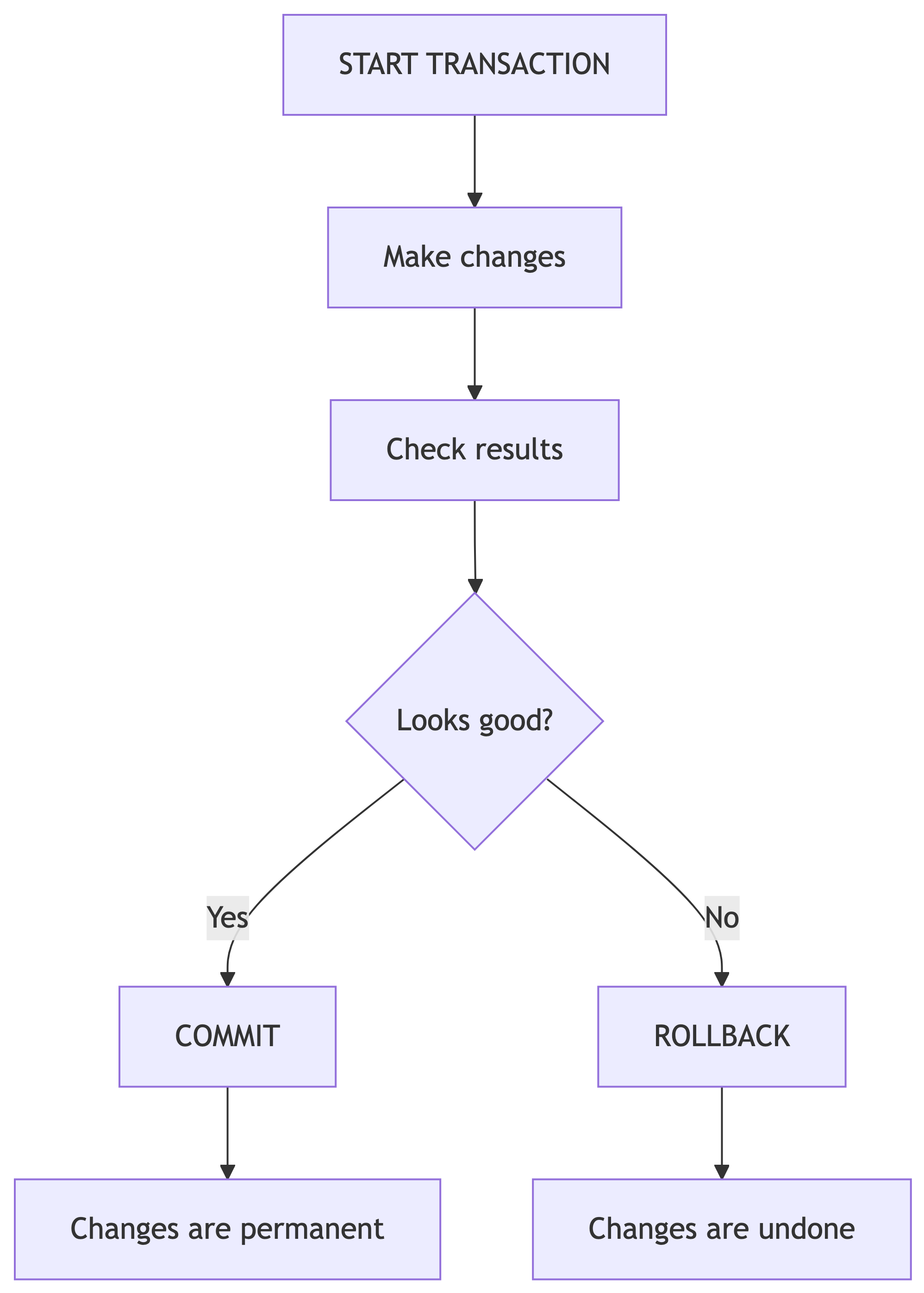
Transaction Demo: The Intentional Mistake
Let us try an UPDATE inside a transaction and intentionally mess it up:
START TRANSACTION;

UPDATE music_catalog_staging
SET artist_name_clean = 'Billlie Eilish'  -- oops, triple L
WHERE artist_name_clean = 'Billie Eilish';

-- Check what we did
SELECT DISTINCT artist_name_clean
FROM music_catalog_staging
ORDER BY artist_name_clean;

-- That is wrong. Undo everything.
ROLLBACK;
After ROLLBACK, the data is exactly as it was before START TRANSACTION.
Transaction Demo: The Correct Fix
After COMMIT, the changes are permanent.
When to Use Transactions
| Use a Transaction | Skip it |
|---|---|
| Bulk UPDATEs on many rows | SELECT queries (read-only) |
| Any DELETE operation | When you have a backup and are confident |
| Multi-step changes that must all succeed | Adding columns (ALTER TABLE) |
| When you are not sure about your WHERE clause | Single-row changes with RETURNING |
Pro tip: if you are asking “should I use a transaction?” the answer is yes. Much like “should I save my document?” the answer is always yes.
Your Turn: Transaction Practice
Try this in Beekeeper:
You should see the count drop dramatically after DELETE, then return to 45 after ROLLBACK.
Knowledge Check 6
You started a transaction and ran an UPDATE that changed 500 rows incorrectly. What undoes the damage?
UNDO;CTRL+Z;ROLLBACK;REVERT;
Answer: Knowledge Check 6
C) ROLLBACK;
ROLLBACK reverses all changes since START TRANSACTION. There is no UNDO or CTRL+Z in SQL. CTRL+Z works in your text editor, not on your database. I have seen grown adults try CTRL+Z on a production database. It did not end well. For anyone.
Phase 7: Column Cleanup and Migration
Swapping Clean Columns In
Now that our clean columns are verified, replace the originals:
-- Drop the original messy columns
ALTER TABLE music_catalog_staging DROP COLUMN artist_name;
ALTER TABLE music_catalog_staging DROP COLUMN genre;
ALTER TABLE music_catalog_staging DROP COLUMN label;

-- Rename clean columns
ALTER TABLE music_catalog_staging
    RENAME COLUMN artist_name_clean TO artist_name;
ALTER TABLE music_catalog_staging
    RENAME COLUMN genre_clean TO genre;
ALTER TABLE music_catalog_staging
    RENAME COLUMN label_clean TO label;
Verify the result:
Clean, consistent, ready to migrate. Our data finally looks like it was entered by someone who cares.
The Migration Plan
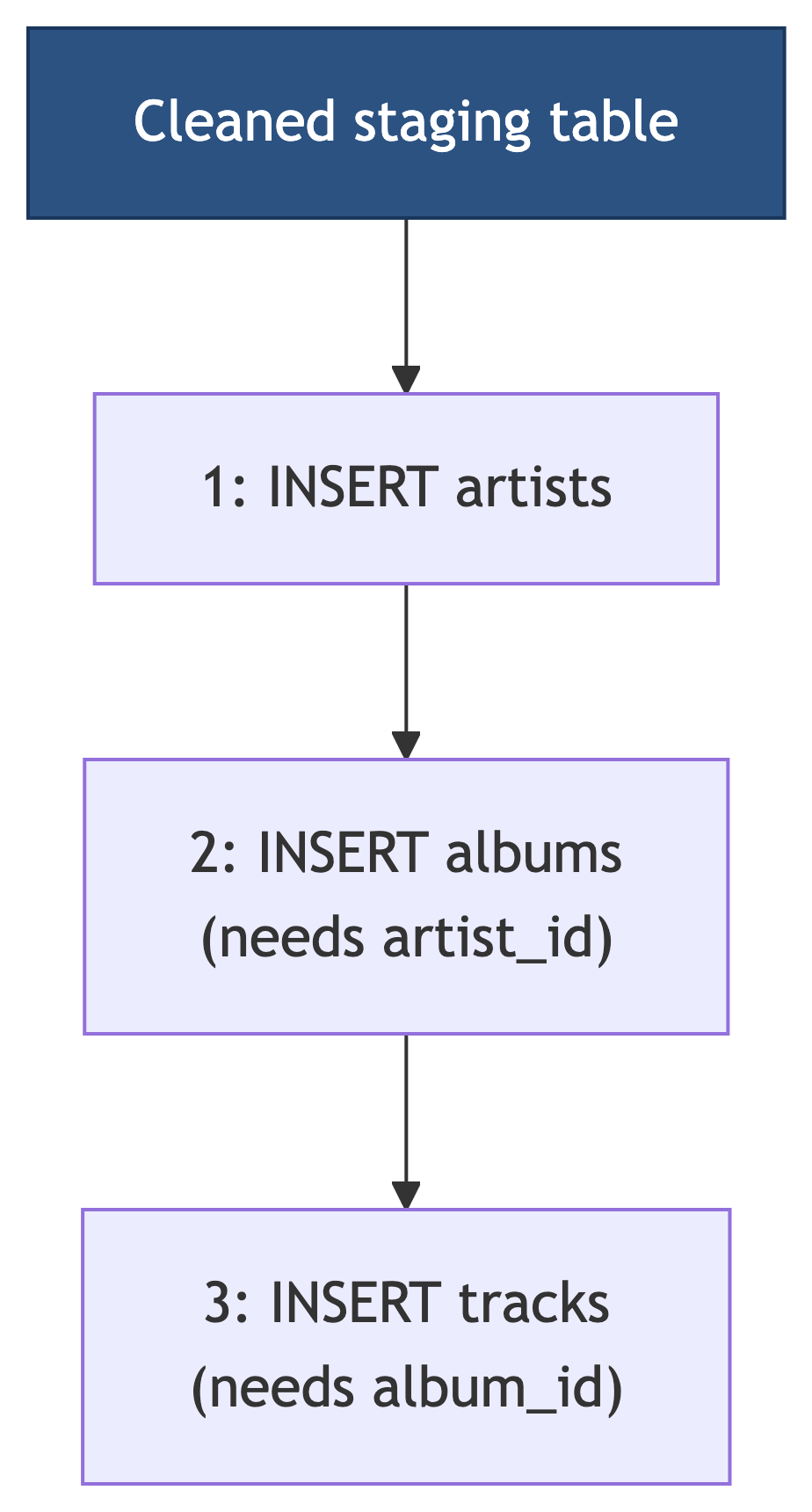
Order matters. Parents before children. Always. We must insert artists first (no dependencies), then albums (needs artist_id), then tracks (needs album_id). Foreign keys enforce this order. Try to skip ahead and PostgreSQL will politely but firmly ruin your afternoon.
Step 1: Migrate Artists
Verify:
You should see one row per unique artist, each with a generated artist_id.
Step 2: Migrate Albums
Albums need an artist_id from the artists table. We join the staging table with artists to get it:
Wait – this will error if the staging table has inconsistent album-level data (different genre or label for the same album). Let us check:
If any rows appear, fix those inconsistencies before migrating.
Handling Album-Level Inconsistencies
If the query above shows albums with multiple genres or labels, pick the correct value and update:
Now retry the album migration INSERT.
Step 3: Migrate Tracks
Tracks need an album_id. We join through both staging, artists, and albums:
INSERT INTO tracks (track_title, track_number, duration_sec, album_id)
SELECT
    s.track_title,
    s.track_number,
    s.track_duration_sec,
    al.album_id
FROM music_catalog_staging s
JOIN artists a ON s.artist_name = a.artist_name
JOIN albums al ON s.album_title = al.album_title
               AND a.artist_id = al.artist_id;
Verify the Migration
-- Spot check: show all tracks with their album and artist
SELECT a.artist_name, al.album_title, al.release_year,
       t.track_number, t.track_title, t.duration_sec
FROM tracks t
JOIN albums al ON t.album_id = al.album_id
JOIN artists a ON al.artist_id = a.artist_id
ORDER BY a.artist_name, al.album_title, t.track_number;
If this looks right, congratulations. You have successfully cleaned and migrated dirty data into a normalized schema. This is genuinely 80% of what data professionals do for a living. The other 20% is explaining to stakeholders why the data was dirty in the first place.
Knowledge Check 7
Why must we insert into the artists table BEFORE the albums table?
Alphabetical order is required
Artists has a UNIQUE constraint
Albums has a foreign key referencing artists, so the artist must exist first
PostgreSQL requires tables to be populated in creation order
Answer: Knowledge Check 7
C) Albums has a foreign key referencing artists, so the artist must exist first
Foreign keys enforce referential integrity. You cannot insert an album with artist_id = 5 if no artist with artist_id = 5 exists yet. It is like trying to RSVP to a party that does not exist. The dependency chain is: artists, then albums, then tracks. Always.
Updating Across Tables
Chapter 10 also introduces updating one table using values from another. The ANSI SQL way uses a subquery:
PostgreSQL also supports a simpler FROM-based syntax:
This is useful when you need to update data in one table based on corrected values in another.
The Table Swap Trick
For large tables, adding and populating columns inflates table size because PostgreSQL keeps old row versions. A more efficient approach from Chapter 10:
-- Create improved copy with extra column
CREATE TABLE music_catalog_staging_v2 AS
SELECT *,
       now()::date AS cleaned_date
FROM music_catalog_staging;

-- Swap using renames
ALTER TABLE music_catalog_staging
    RENAME TO music_catalog_staging_old;
ALTER TABLE music_catalog_staging_v2
    RENAME TO music_catalog_staging;
ALTER TABLE music_catalog_staging_old
    RENAME TO music_catalog_staging_backup;
This avoids row inflation on large datasets. For our 45-row table it does not matter, but on millions of rows it is the difference between “that was fast” and “I am going to get lunch while this runs.”
Final Cleanup
Drop the Backup (When You Are Done)
Only after you have verified your normalized tables are correct. Not before. Not “I think it looks fine.” Verified. With queries. With your eyes. With conviction.
Knowledge Check 8 (Open Answer)
You receive a 50,000-row CSV of customer orders. Some orders have misspelled product names, NULL shipping addresses, duplicate order IDs, and prices stored as negative numbers. Describe the first six steps you would take before loading this data into production tables.
Take 2 minutes. Write it down. Compare with a neighbor.
Sample Answer: Knowledge Check 8
- Import into a staging table with no constraints
- Count rows to verify the full file loaded
- Check for duplicates using GROUP BY + HAVING on order IDs and on content columns
- Check for NULLs in required fields (shipping address, product name)
- Create a backup of the staging table
- Fix issues using UPDATE with clean columns, DELETE for true duplicates, and transactions for safety
Then: verify, migrate to normalized tables, verify again. In that order. Always. I cannot stress this enough. I will haunt your databases if you skip verification.
Deliverable Checklist
Before you submit your cleanup.sql, make sure it contains:
Summary
Key Commands Cheat Sheet
Modification:
| Task | SQL |
|---|---|
| Update data | UPDATE SET WHERE |
| Update + verify | UPDATE ... RETURNING |
| Add column | ALTER TABLE ADD COLUMN |
| Drop column | ALTER TABLE DROP COLUMN |
| Rename column | ALTER TABLE RENAME COLUMN |
| Delete rows | DELETE FROM WHERE |
| Drop table | DROP TABLE |
Safety and Migration:
| Task | SQL |
|---|---|
| Backup table | CREATE TABLE ... AS SELECT |
| Begin transaction | START TRANSACTION |
| Save changes | COMMIT |
| Undo changes | ROLLBACK |
| Migrate data | INSERT INTO ... SELECT |
| Cross-table update | UPDATE ... FROM |
| Title case | initcap() |
| Concatenate | \|\| |
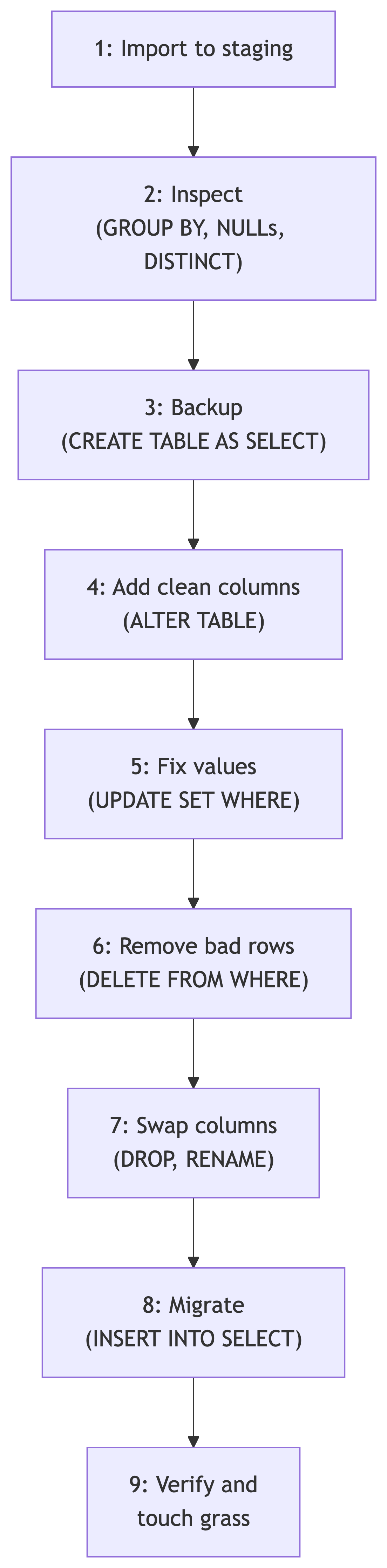
The Data Cleaning Pipeline
What Is Next
Coming Up
Now that we can clean and migrate data, next we explore:
- Aggregate functions and grouping for analysis
- Statistical queries on our cleaned music database
- Window functions for rankings and running totals
Your cleaned, normalized music database will be the foundation for those analyses. Look at you, growing up. I am genuinely proud.
References
Sources
DeBarros, A. (2022). Practical SQL: A Beginner’s Guide to Storytelling with Data (2nd ed.). No Starch Press. Chapter 10: Inspecting and Modifying Data.
PostgreSQL Documentation. “UPDATE.” https://www.postgresql.org/docs/current/sql-update.html
PostgreSQL Documentation. “ALTER TABLE.” https://www.postgresql.org/docs/current/sql-altertable.html
PostgreSQL Documentation. “Transactions.” https://www.postgresql.org/docs/current/tutorial-transactions.html
PostgreSQL Documentation. “INSERT.” https://www.postgresql.org/docs/current/sql-insert.html