
Lecture 01: Introduction to Data Engineering
DATA 503: Fundamentals of Data Engineering
January 12, 2026
Setting the stage
What We’ll Discuss
- What data engineering is and why it exists
- The data engineering pipeline
- Relational databases as a workhorse
- SQL as your first “superpower”
The setting
- In this lecture, our data world is Dunder Mifflin.
- We will use familiar Office characters, events, and business problems as examples.
- The goal is not TV trivia.
- The goal is to make abstract engineering ideas feel concrete.
Quick question
If you had to define data engineering in one sentence, what would you say?
- Write your sentence in 15 seconds.
- Share with the person next to you.
What counts as “data” at Dunder Mifflin?
Examples include:
- Sales calls, quotes, invoices
- Customer records and contacts
- Warehouse inventory and shipping logs
- HR data (hiring, training, performance)
- Emails and calendar invites
- “Prank events” if Dwight is logging them
Mini-quiz
Which role is primarily responsible for making raw data reliable and accessible for others?
A. Data Analyst
B. Data Scientist
C. Data Engineer
D. Product Manager
Answer: C
The point of data engineering
The data engineer’s job
- Build systems that move and shape data so it can be used reliably.
- Make data easy to find, trustworthy, and fast to access.
- Reduce chaos so others can do analysis, reporting, and ML.
In The Office terms
Michael wants a dashboard in 10 minutes.
- “How many sales did we make this week?”
- “Which customers are at risk of churning?”
- “What does the warehouse backlog look like?”
Your job is to make those questions answerable without manual spreadsheet heroics.
Where things break
Common failure modes:
- Data is missing or duplicated.
- Definitions are inconsistent.
- The report takes 40 minutes to run.
- Nobody knows which table to trust.
- The pipeline fails silently on a Tuesday.
Think-pair-share: “The spreadsheet problem”
Prompt:
- Think of a time a spreadsheet became the system of record.
- What went wrong?
- What would you build instead?
Directions:
- Think (1 minute)
- Pair (3 minutes)
- Share (3 to 4 pairs with the room)
A pipeline mental model
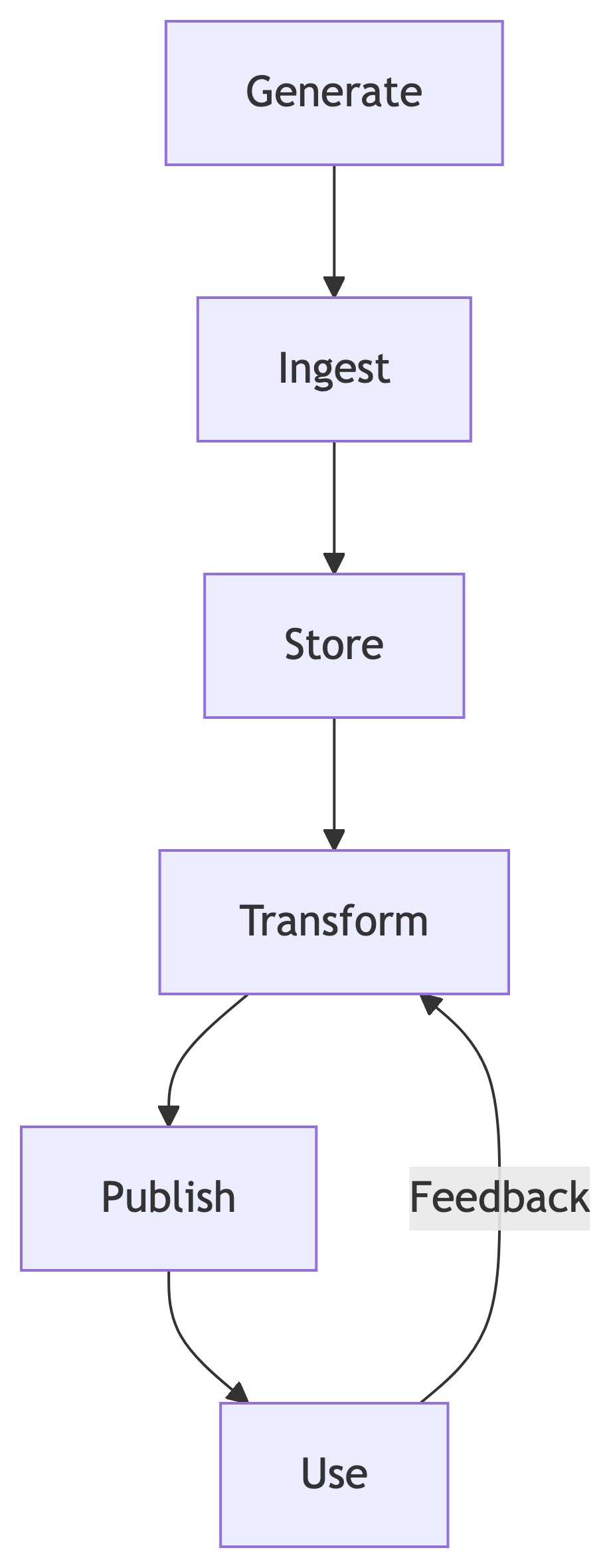
A pipeline is a repeatable path from sources to usable outputs.
The “why” in one slide
Data engineering exists because:
- Data is produced by many systems.
- Data changes over time.
- Data is messy.
- Organizations still need answers on demand.
Data quality and trust
The Five V’s (Scranton edition)
- Volume
- How much data: every order, every call, every invoice
- Velocity
- How fast it arrives: live sales calls vs nightly shipments
- Variety
- Tables, PDFs, emails, phone call logs, images
- Veracity
- Can we trust it: typos, duplicates, missing values
- Value
- Does it help decisions: pricing, staffing, inventory planning
Quick question
Which “V” is usually hardest in your experience?
Raise a hand for:
- Volume
- Velocity
- Variety
- Veracity
- Value
Veracity is usually the silent killer
A simple example:
- Sales reps enter customer names manually.
- “Prince Family Paper” becomes:
- Prince Family Paper
- Prince Family Papers
- Prince Family Papeer
Now “top customers” depends on spelling.
Data quality is not just correctness
Also think about:
- Consistency across systems
- Timeliness
- Completeness
- Lineage (where it came from)
- Observability (how you know it is working)
ETL, ELT, and the lifecycle
ETL vs ELT
ETL:
- Extract
- Transform
- Load
ELT:
- Extract
- Load
- Transform (inside the warehouse)
Why the difference matters
ETL is often:
- Great for strict control and smaller volumes
- Easier to reason about transformations
ELT is often:
- Faster to iterate for analytics teams
- More flexible once data is centralized
Batch vs streaming
Batch:
- “Run the daily sales rollup at 2am”
- Often cheaper and simpler
Streaming:
- “Update the live sales leaderboard every minute”
- More complex but lower latency
Think-pair-share: choose a mode
Scenario:
- Corporate asks for a daily report of sales by rep.
- Michael asks for a live leaderboard on a TV in the office.
Questions:
- Which use case is batch?
- Which use case is streaming?
- What do you lose when you choose batch?
What “production” means
A pipeline is production when:
- It runs on a schedule or event.
- It is monitored.
- Failures alert the right humans.
- Data contracts are stable enough that changes are managed.
A small lifecycle picture
Break (10 minutes)
During break:
- Pick one question you want answered about data engineering.
- Write it down.
- We will collect a few when we return.
Relational databases
Why relational databases still matter
Relational databases remain a core tool because:
- Tables match how many business questions are asked.
- SQL is powerful and widely supported.
- Constraints and relationships reduce duplication and ambiguity.
- They are a reliable foundation for analytics and applications.
When a relational database is a good fit
- You have structured entities (customers, orders, employees).
- You care about relationships and integrity.
- You need precise querying and joins.
- You want constraints (unique, foreign keys).
Our tiny Dunder Mifflin dataset
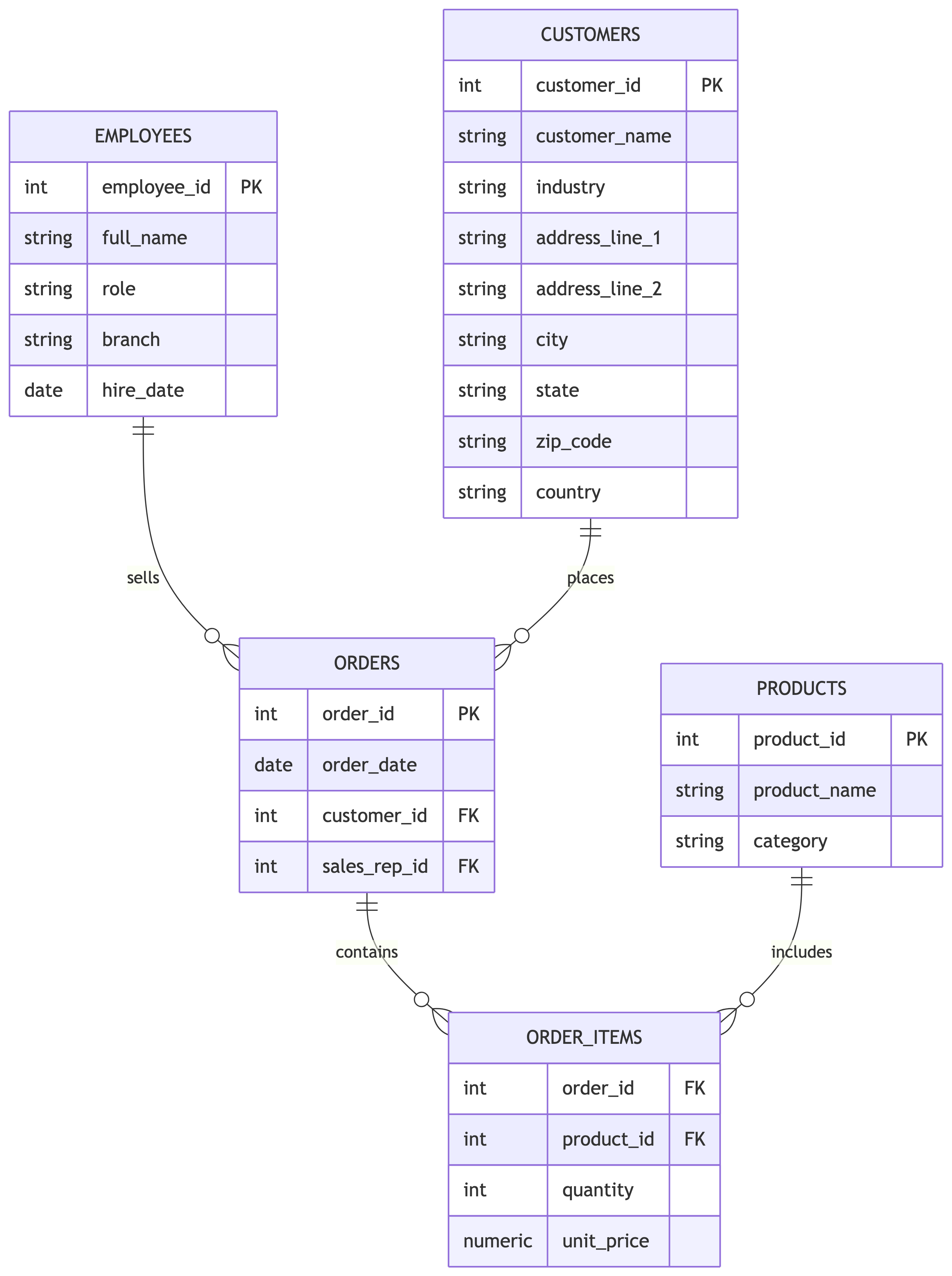
We will pretend we have these tables:
- employees
- customers
- orders
- order_items
- products
- episodes (optional, for fun)
Example: employees
Columns:
- employee_id (PK)
- full_name
- role
- branch
- hire_date
Note
Primary Key (PK) is a unique identifier for each row in the table. More on this later.
Sample employees data
| employee_id | full_name | role | branch | hire_date |
|---|---|---|---|---|
| 1 | Michael Scott | Regional Manager | Scranton | 1992-03-15 |
| 2 | Dwight Schrute | Assistant Regional Manager | Scranton | 1995-04-01 |
| 3 | Jim Halpert | Sales Representative | Scranton | 1999-08-01 |
| 4 | Pam Beesly | Receptionist | Scranton | 2000-01-03 |
| 5 | Stanley Hudson | Sales Representative | Scranton | 1990-09-10 |
| 6 | Phyllis Vance | Sales Representative | Scranton | 2000-02-14 |
| 7 | Kevin Malone | Accountant | Scranton | 1998-06-15 |
| 8 | Oscar Martinez | Accountant | Scranton | 1996-11-20 |
| 9 | Angela Martin | Head of Accounting | Scranton | 1994-05-05 |
| 10 | Creed Bratton | Quality Assurance | Scranton | 1993-12-01 |
Example: customers
Columns:
- customer_id (PK)
- customer_name
- industry
- address_line_1
- address_line_2
- city
- state
- zip_code
- country
Example: orders and order_items
orders:
- order_id (PK)
- order_date
- customer_id (FK)
- sales_rep_id (FK)
order_items:
- order_id (FK)
- product_id (FK)
- quantity
- unit_price
Note
Foreign Key (FK) is a reference to a primary key in another table. More on this later.
A simple schema view
Quick question
In what table is the best place to add another address field so that we have both a billing and shipping address?
A. customers
B. orders
C. order_items
D. products
Answer: A
Note
BUT, we should ask ourselves if there is a better way to approach this problem.
Normalization in one minute
Normalization is a way to reduce duplication.
- Store the customer names once in customers.
- Reference customers from orders.
- Avoid rewriting customer names on every order.
Think-pair-share: what is the primary key?
Prompt:
- For “episodes”, what could be a reasonable primary key?
- For “orders”, why is a single order_id better than (customer_id, date)?
Directions:
- Think (1 minute)
- Pair (2 minutes)
- Share (2 pairs)
SQL: asking questions
SQL is how you ask for answers
SQL lets you:
- Select columns
- Filter rows
- Sort results
- Limit output
- Combine tables with joins
- Aggregate (count, sum, average)
Today we focus on SELECT fundamentals.
The shape of a SELECT query
Start simple
All employees:
| employee_id | full_name | role | branch | hire_date |
|---|---|---|---|---|
| 1 | Michael Scott | Regional Manager | Scranton | 1992-03-15 |
| 2 | Dwight Schrute | Assistant Regional Manager | Scranton | 1995-04-01 |
| 3 | Jim Halpert | Sales Representative | Scranton | 1999-08-01 |
| 4 | Pam Beesly | Receptionist | Scranton | 2000-01-03 |
| 5 | Stanley Hudson | Sales Representative | Scranton | 1990-09-10 |
| 6 | Phyllis Vance | Sales Representative | Scranton | 2000-02-14 |
| 7 | Kevin Malone | Accountant | Scranton | 1998-06-15 |
| 8 | Oscar Martinez | Accountant | Scranton | 1996-11-20 |
| 9 | Angela Martin | Head of Accounting | Scranton | 1994-05-05 |
| 10 | Creed Bratton | Quality Assurance | Scranton | 1993-12-01 |
Note
SELECT * is a wildcard that selects all columns. It is not a good practice to use * in production queries. Instead, you should list the columns you need.
Choose columns
Only names and roles:
| full_name | role |
|---|---|
| Michael Scott | Regional Manager |
| Dwight Schrute | Assistant Regional Manager |
| Jim Halpert | Sales Representative |
| Pam Beesly | Receptionist |
| Stanley Hudson | Sales Representative |
| Phyllis Vance | Sales Representative |
| Kevin Malone | Accountant |
| Oscar Martinez | Accountant |
| Angela Martin | Head of Accounting |
| Creed Bratton | Quality Assurance |
DISTINCT
Unique branches:
| branch |
|---|
| Scranton |
WHERE
All Scranton employees:
| full_name | role |
|---|---|
| Michael Scott | Regional Manager |
| Dwight Schrute | Assistant Regional Manager |
| Jim Halpert | Sales Representative |
| Pam Beesly | Receptionist |
| Stanley Hudson | Sales Representative |
| Phyllis Vance | Sales Representative |
| Kevin Malone | Accountant |
| Oscar Martinez | Accountant |
| Angela Martin | Head of Accounting |
| Creed Bratton | Quality Assurance |
ORDER BY
Newest hires first:
| full_name | hire_date |
|---|---|
| Phyllis Vance | 2000-02-14 |
| Pam Beesly | 2000-01-03 |
| Jim Halpert | 1999-08-01 |
| Kevin Malone | 1998-06-15 |
| Oscar Martinez | 1996-11-20 |
| Dwight Schrute | 1995-04-01 |
| Angela Martin | 1994-05-05 |
| Creed Bratton | 1993-12-01 |
| Michael Scott | 1992-03-15 |
| Stanley Hudson | 1990-09-10 |
LIMIT
Top 5 newest hires:
| full_name | hire_date |
|---|---|
| Phyllis Vance | 2000-02-14 |
| Pam Beesly | 2000-01-03 |
| Jim Halpert | 1999-08-01 |
| Kevin Malone | 1998-06-15 |
| Oscar Martinez | 1996-11-20 |
Building a query step by step
Question:
- “Show the 5 largest order line items by total line value.”
We define line value as:
- quantity * unit_price
Step 1: pick columns
Step 2: add a computed column
Step 3: sort and limit
Quick question
If you filter rows, which clause do you use?
A. FROM
B. WHERE
C. ORDER BY
D. LIMIT
Answer: B
Informal exercise: build a SELECT
The exercise (individual then pair)
We are going to build a single SELECT statement for a given table.
Table:
- episodes
Columns:
- episode_id
- season
- episode_number
- title
- air_date
- imdb_rating
Task 1
Write a query to list:
- season
- episode_number
- title
- imdb_rating
Conditions:
- only season 2
- only ratings 8.5 or higher
Output:
- highest rated first
Limit:
- top 5
Hint: start from the skeleton
Think-pair-share: compare solutions
Directions:
- Think (2 minutes): write your query.
- Pair (3 minutes): compare with a neighbor.
- Share (3 minutes): we will build the “class version” together.
One possible solution
Task 2
Modify your query to break ties by episode_number ascending.
One possible solution
A peek ahead: joins
Why joins exist
Most real questions require combining tables.
Example:
- “Which customers did Jim sell to last month?”
- That information is split across:
- employees
- orders
- customers
Conceptual join

Quick question
What is the main purpose of a foreign key?
A. Make queries faster
B. Guarantee a relationship points to an existing row
C. Store text efficiently
D. Replace the need for indexes
Answer: B
Wrap-up
What you should leave with
- A clear definition of what data engineering is.
- A mental model of a pipeline.
- A sense of why relational databases matter.
- The ability to write basic SELECT queries with:
- WHERE
- ORDER BY
- LIMIT
- DISTINCT
Exit ticket
Write down:
- One concept that felt clear.
- One concept that felt fuzzy.
- One question you want answered next lecture.
Send me your answers on Canvas on the Week 1 Participation Activity.
Vibe check
- If you had to explain “ETL vs ELT” to Michael in two sentences, what would you say?
- If you had to explain “foreign key” to Dwight in two sentences, what would you say?