
Lecture 05-3: Pet Clinic Assignment
DATA 503: Fundamentals of Data Engineering
February 9, 2026
Overview 📖
Process
You have seen the entire pipeline in action with the music catalog. Now you will do it yourself, start to finish, with a new dataset. No scaffolding. No guided steps. Just you, a messy CSV, and everything you have learned.
The Assignment 📝
Overview
A small veterinary clinic needs a database to track their patients, owners, and visits. They currently have everything in a single spreadsheet. It has problems.
Your job:
- Import the raw CSV into a staging table
- Design a normalized schema
- Build the tables with proper constraints
- Audit the data for quality issues
- Fix the issues
- Migrate the data into your normalized tables
- Verify everything works
- Document your process in a Data Design Journal
The Raw Data
Here is the spreadsheet the clinic gave you:
| owner_name | owner_email | owner_phone | pet_name | species | breed | visit_date | reason | cost |
|---|---|---|---|---|---|---|---|---|
| Maria Lopez | maria@email.com | 503-555-0101 | Luna | Dog | Labrador | 2026-01-15 | Checkup | 75.00 |
| Maria Lopez | maria@email.com | 503-555-0101 | Luna | Dog | Labrador | 2026-02-01 | Vaccination | 120.00 |
| Maria Lopez | MARIA@EMAIL.COM | 503-555-0101 | Whiskers | Cat | Siamese | 2026-01-20 | Dental | 250.00 |
| James Park | james@email.com | 541-555-0202 | Buddy | dog | Golden Retriever | 2026-01-18 | Surgery | 800.00 |
| James Park | james@email.com | Buddy | dog | Golden Retriever | 2026-02-05 | Follow-up | 50.00 | |
| Sarah Chen | sarah@email.com | 971-555-0303 | Max | Dog | Poodle | 2026-01-22 | Checkup | 75.00 |
| Sarah Chen | sarah@email.com | 971-555-0303 | Bella | cat | Persian | 2026-01-25 | Vaccination | 95.00 |
| James Park | james@email.com | 541-555-0202 | Rocky | Reptile | Bearded Dragon | 2026-02-03 | Checkup | 65.00 |
Take a minute. Count the problems. There are more than you think.
The Pipeline
You will follow the same pipeline we used for the music catalog:
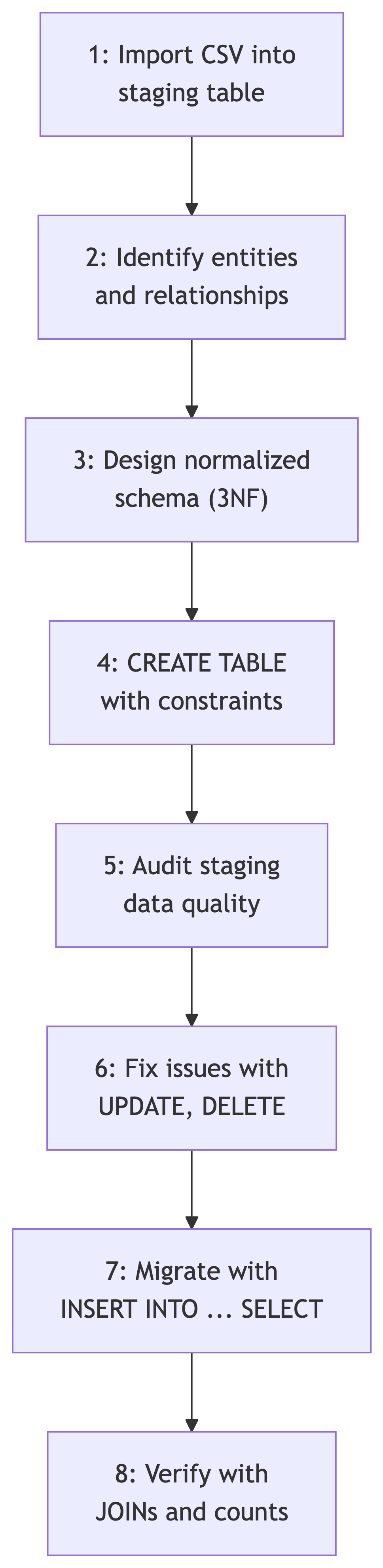
Every step requires decisions. Document those decisions. That is where the journal comes in.
The Data Design Journal 📝
What Is It?
A Data Design Journal is a written record of your design process. It captures not just what you built, but why you built it that way. In professional data engineering, this is called documentation. In this course, it is called a requirement.
You did a brief version of this in your normalization assignment. This time, it is the full version.
Why It Matters
Two engineers can look at the same data and design different schemas. Neither is necessarily wrong. The journal explains your reasoning so that someone else (or future you) can understand the trade-offs you considered.
It also forces you to think before you type. The number of database problems caused by typing before thinking is nonzero.
Journal Sections
Your journal should include these parts:
| Section | What Goes Here |
|---|---|
| Problem Statement | What are you building and why? |
| Assumptions | What did you assume about the data and the domain? |
| Normalization Decisions | How did you identify entities? What normal form and why? |
| Schema Design | Table definitions, keys, constraints, and the reasoning behind each |
| Migration Steps | How you audited, fixed, and migrated the data |
| Verification | How you confirmed the migration was correct |
| Reflection | What you learned, what you would do differently |
Problem Statement
A brief description of the scenario and the goal. One paragraph. Not a novel. Think of it as explaining the project to a colleague who just sat down next to you.
Assumptions
Things you assumed about the domain that influenced your design. For example:
- Can a pet have multiple owners?
- Can two owners share the same email?
- What species does the clinic treat?
- Can a visit have zero cost (pro bono)?
- What happens to pet records when an owner leaves?
These are not trick questions. They are design decisions that affect your schema.
Normalization Decisions
How you went from one flat table to multiple related tables. Identify:
- The entities you found
- The relationships between them (one-to-many, many-to-many)
- What normal form you targeted and why
- Any denormalization decisions and their justification
Schema Design
The actual CREATE TABLE statements with annotations explaining:
- Why you chose natural vs surrogate keys
- Which columns are NOT NULL and why
- What CHECK constraints you added and what they prevent
- Your ON DELETE behavior choices
- Which indexes you created and what queries they support
Migration Steps
A walkthrough of your audit, fix, and migration process:
- What quality issues you found
- How you fixed each one
- The INSERT INTO … SELECT statements you used
- Whether you used transactions (you should)
Verification
How you confirmed the migration worked:
- Row count comparisons
- JOIN queries that reconstruct the original data
- Constraint validation (any violations?)
- Edge case checks
Reflection
The honest part. What went well? What surprised you? What would you do differently next time? This section is graded on thoughtfulness, not on perfection. Everyone makes mistakes. The ones who learn from them are the ones who write them down.
Deliverables 📦
What to Submit
Two things:
SQL file – All your SQL statements, in order, from staging table creation through verification. It should be runnable top to bottom on a clean database.
Data Design Journal – A written document (Markdown or PDF) covering all seven sections described above.
Grading Priorities
The journal and the SQL carry equal weight. A technically correct migration with no documentation is incomplete. A beautifully written journal with broken SQL is also incomplete. You need both.
What I am looking for:
- A working pipeline (import through verification)
- Appropriate constraints (not too few, not too many)
- Data quality issues identified and fixed
- Transactions used for the migration
- Clear reasoning in the journal
- Honest reflection
References 📚
Sources
DeBarros, A. (2022). Practical SQL: A Beginner’s Guide to Storytelling with Data (2nd ed.). No Starch Press. Chapters 7 and 9.
PostgreSQL Documentation. “CREATE TABLE.” https://www.postgresql.org/docs/current/sql-createtable.html
PostgreSQL Documentation. “Constraints.” https://www.postgresql.org/docs/current/ddl-constraints.html