Lecture 08-1: Web Scraping
DATA 503: Fundamentals of Data Engineering
March 4, 2026
Our Target: Discogs Most Collected Releases
We are going to scrape the Most Collected Releases from Discogs, the world’s largest music database. 🎵
We want: album name, artist name, and then we will follow the link to each album’s detail page to grab the average rating and number of ratings. This is a two-level scrape.
The Sitemap Structure
Our scrape has two levels: the search results page and each album’s detail page:
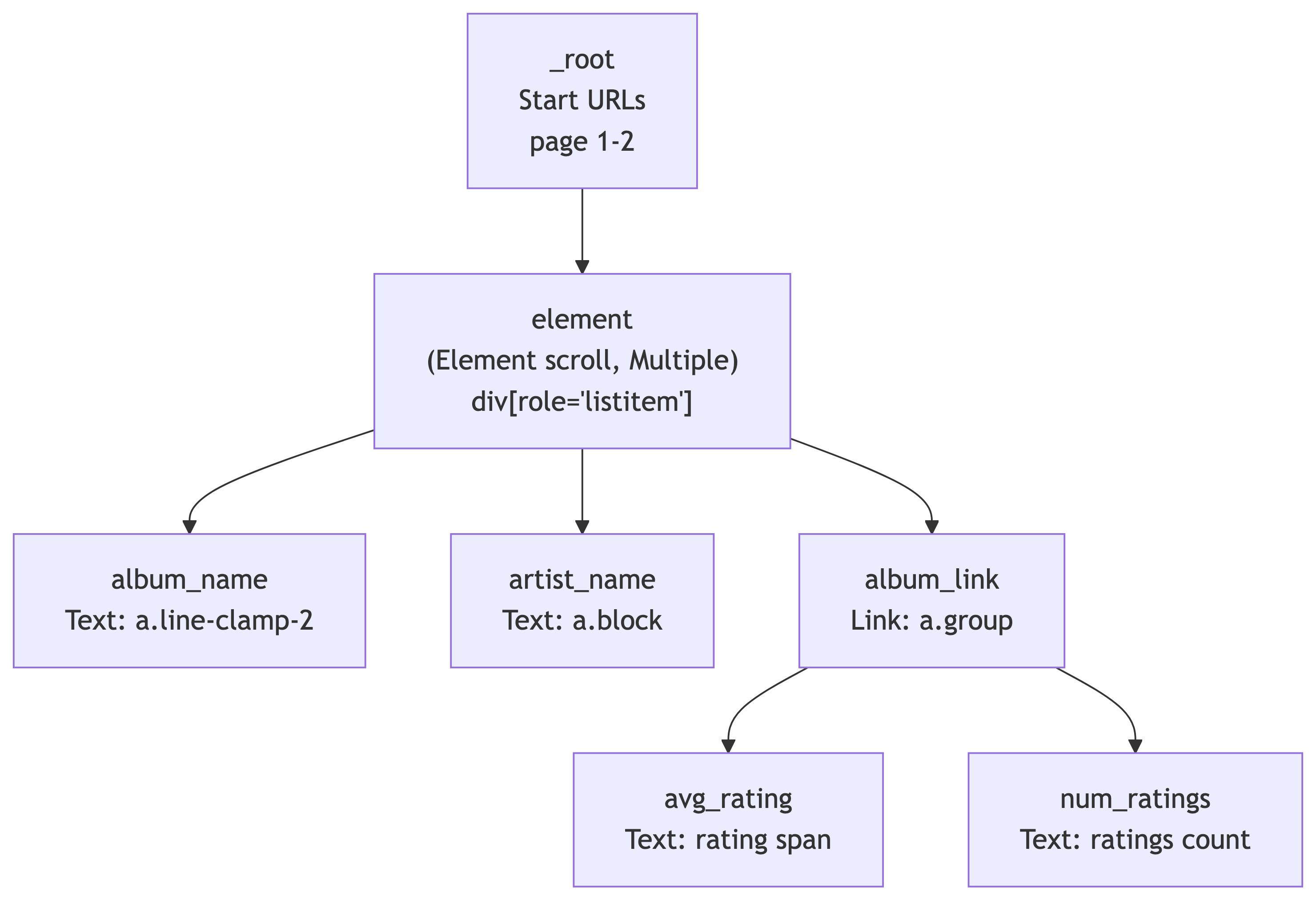
The element selector (Element scroll) handles grouping each search result card. Under it, we extract text (album_name, artist_name) and follow links (album_link) to detail pages where we grab ratings.
Step 1: Create a New Sitemap
- Open DevTools (
F12orCmd+Opt+I) and go to the Web Scraper tab - Click Create new sitemap > Create Sitemap
- Sitemap name:
discogs5 - Start URL:
https://www.discogs.com/search?sort=have%2Cdesc&type=release&page=[1-2]
We use [1-2] to scrape the first 2 pages (~50 results). You can increase this later, but start small when testing. 🧪
Step 2: Add the Element Scroll Selector
This groups each search result card on the page and handles scroll-based loading:
- Make sure you are at the **_root** level of selectors
- Click Add new selector
- ID:
element - Type: Element scroll
- Selector:
div[role='listitem'] - Check Multiple (there are many result cards per page)
- Click Save selector
Why Element (scroll)? Discogs search results load dynamically. The Element scroll selector automatically scrolls to load all items and groups each result card as a container for child selectors.
Step 3: Add the Album Name Text Selector
Navigate into the element selector (click on it), then:
- Click Add new selector
- ID:
album_name - Type: Text
- Selector: Click Select, then click an album title in the search results. The CSS selector should be
a.line-clamp-2 - Leave Multiple unchecked (one album name per result card)
- Click Save selector
Use Data Preview to verify it is grabbing album names correctly. ✅
Step 4: Add the Artist Name Text Selector
Still inside the element selector:
- Click Add new selector
- ID:
artist_name - Type: Text
- Selector: Click Select, then click an artist name. The CSS selector should be
a.block - Leave Multiple unchecked
- Click Save selector
Data Preview should now show artist names alongside album names.
Step 5: Add the Album Link Selector
This is the key step. We need to follow the link to each album’s detail page to get ratings:
- Still inside
element, click Add new selector - ID:
album_link - Type: Link
- Selector: Click Select, then click the album card/link area. The CSS selector should be
a.group - Check Multiple (there are many album links per page)
- Link type: linkFromHref
- Click Save selector
This tells the scraper: “For each result on the page, follow this link to the detail page.” The child selectors under album_link will extract data from those detail pages. 🔗
Step 6: Add Detail Page Selectors
Navigate into the album_link selector. Now we define what to extract from each album’s detail page.
Average Rating:
- Click Add new selector
- ID:
avg_rating - Type: Text
- Selector: Navigate to any album detail page manually to build this selector. Find the average rating value. The CSS selector should be
.section_Odw8o div div ul:nth-of-type(1) span:nth-of-type(2) - Click Save selector
Number of Ratings:
- Click Add new selector
- ID:
num_ratings - Type: Text
- Selector: Find the total number of ratings on the detail page. The CSS selector should be
#release-stats li:nth-of-type(4) a - Click Save selector
The Complete Selector Tree
Your sitemap should now look like this:
| Selector ID | Type | Parent | CSS Selector |
|---|---|---|---|
element |
Element scroll | _root |
div[role='listitem'] |
album_name |
Text | element |
a.line-clamp-2 |
artist_name |
Text | element |
a.block |
album_link |
Link | element |
a.group |
avg_rating |
Text | album_link |
.section_Odw8o div div ul:nth-of-type(1) span:nth-of-type(2) |
num_ratings |
Text | album_link |
#release-stats li:nth-of-type(4) a |
Importing the Sitemap Directly
If you prefer to skip building it manually, you can import the complete sitemap JSON:
- Go to the Web Scraper tab in DevTools
- Click Create new sitemap > Import Sitemap
- Paste this JSON and click Import:
{
  "_id": "discogs5",
  "startUrl": [
    "https://www.discogs.com/search?sort=have%2Cdesc&type=release&page=[1-2]"
  ],
  "selectors": [
    {
      "id": "element",
      "parentSelectors": ["_root"],
      "selector": "div[role='listitem']",
      "multiple": true,
      "type": "SelectorElementScroll",
      "delay": 2000
    },
    {
      "id": "album_name",
      "multiple": false,
      "parentSelectors": ["element"],
      "selector": "a.line-clamp-2",
      "type": "SelectorText",
      "version": 2
    },
    {
      "id": "artist_name",
      "multiple": false,
      "parentSelectors": ["element"],
      "selector": "a.block",
      "type": "SelectorText",
      "version": 2
    },
    {
      "id": "album_link",
      "linkType": "linkFromHref",
      "multiple": true,
      "parentSelectors": ["element"],
      "selector": "a.group",
      "type": "SelectorLink",
      "version": 2
    },
    {
      "id": "avg_rating",
      "multiple": false,
      "parentSelectors": ["album_link"],
      "selector": ".section_Odw8o div div ul:nth-of-type(1) span:nth-of-type(2)",
      "type": "SelectorText",
      "version": 2
    },
    {
      "id": "num_ratings",
      "multiple": false,
      "parentSelectors": ["album_link"],
      "selector": "#release-stats li:nth-of-type(4) a",
      "type": "SelectorText",
      "version": 2
    }
  ]
}
Step 7: Preview and Validate
Before running the full scrape, always check:
- Click Element preview on each selector. Are the correct elements highlighted?
- Click Data preview on
album_nameandartist_name. Do they show real data? - Navigate to a detail page manually and test
avg_ratingandnum_ratingselement previews there
If the preview looks wrong, the scrape will be wrong. Trust the preview. 🔎
Step 8: Run the Scrape
- Click Scrape in the Sitemap menu
- Set Request interval: 2000ms (be polite to Discogs servers)
- Set Page load delay: 2000ms
- Click Start scraping
A popup window will open and start loading pages. It will visit each search results page, extract album/artist names, then follow each album link to grab ratings from the detail pages. Do not close the popup. Go get coffee ☕ this is a two-level scrape so it takes longer than a single-page scrape.
Step 9: Export the Data
Once scraping is complete:
- Click Browse to preview scraped data
- Click Export data as CSV
- Save the file. This is your raw dataset! 📊
Congratulations, you just built a two-level scraping pipeline with zero code. You scraped search results AND followed links to detail pages for extra data. Your future self who has to write Python scrapers will be jealous. 😎
What We Scraped
| Field | Source | Description |
|---|---|---|
album_name |
Search results page | Album/release title |
artist_name |
Search results page | Artist or band name |
album_link |
Search results page | URL to the album detail page |
avg_rating |
Album detail page | Average user rating (e.g., 4.21) |
num_ratings |
Album detail page | Total number of user ratings |
This is our raw data. In a real pipeline, we would clean, transform, and load this into a database.
Your Turn: Scrape the Top 200 Vinyl Releases of 2010-2020 🎯
Work individually or with a neighbor. You are going to build your own sitemap from scratch using what we just learned.
The Use Case: Discogs tracks which releases are the most collected by users worldwide. We want to find the most collected vinyl releases from the 2010s decade and pull rating data from each album’s detail page.
The Search URL
Start with this base URL in your browser:
https://www.discogs.com/search?sort=have%2Cdesc&type=release&year1=2010&year2=2020&format_exact=VinylThis applies the following filters:
| Filter | Value |
|---|---|
| Sort | Most Collected (have, descending) |
| Type | Release |
| Year Range | 2010 to 2020 |
| Format | Vinyl |
Open this URL in Chrome and verify you see vinyl releases sorted by collector count.
Your Task
Build a Web Scraper sitemap that:
- Scrapes the first 4 pages of results (~100 releases) using range URLs
- Uses an Element scroll selector with
div[role='listitem']to group each result - Extracts the artist name and album name from each search result
- Follows the link to each album’s detail page
- Extracts the average rating and number of ratings from the detail page
Bonus fields (if you finish early):
- Year and format info from the search results page
- “Have” count and “Want” count from the detail page
Hints 💡
- Your sitemap structure should look very similar to the
discogs5demo we just built - Use an Element scroll selector at the root level with
div[role='listitem'] - Use a Link selector to navigate to detail pages
- Use the Select tool and Data Preview to verify each selector before moving on
- If a CSS selector does not work, try using
P(parent) orC(child) keys while the Select tool is active
Expected Output
When you export to CSV, each row should have:
| Column | Example Value |
|---|---|
artist_name |
Adele |
album_name |
21 |
album_link |
https://www.discogs.com/release/… |
avg_rating |
4.18 |
num_ratings |
1,247 |
You have 15 minutes. When you are done (or stuck), we will compare sitemaps. ⏱️
Solution: The Complete Sitemap
Here is a working sitemap for this exercise. You can import it via Create new sitemap > Import Sitemap:
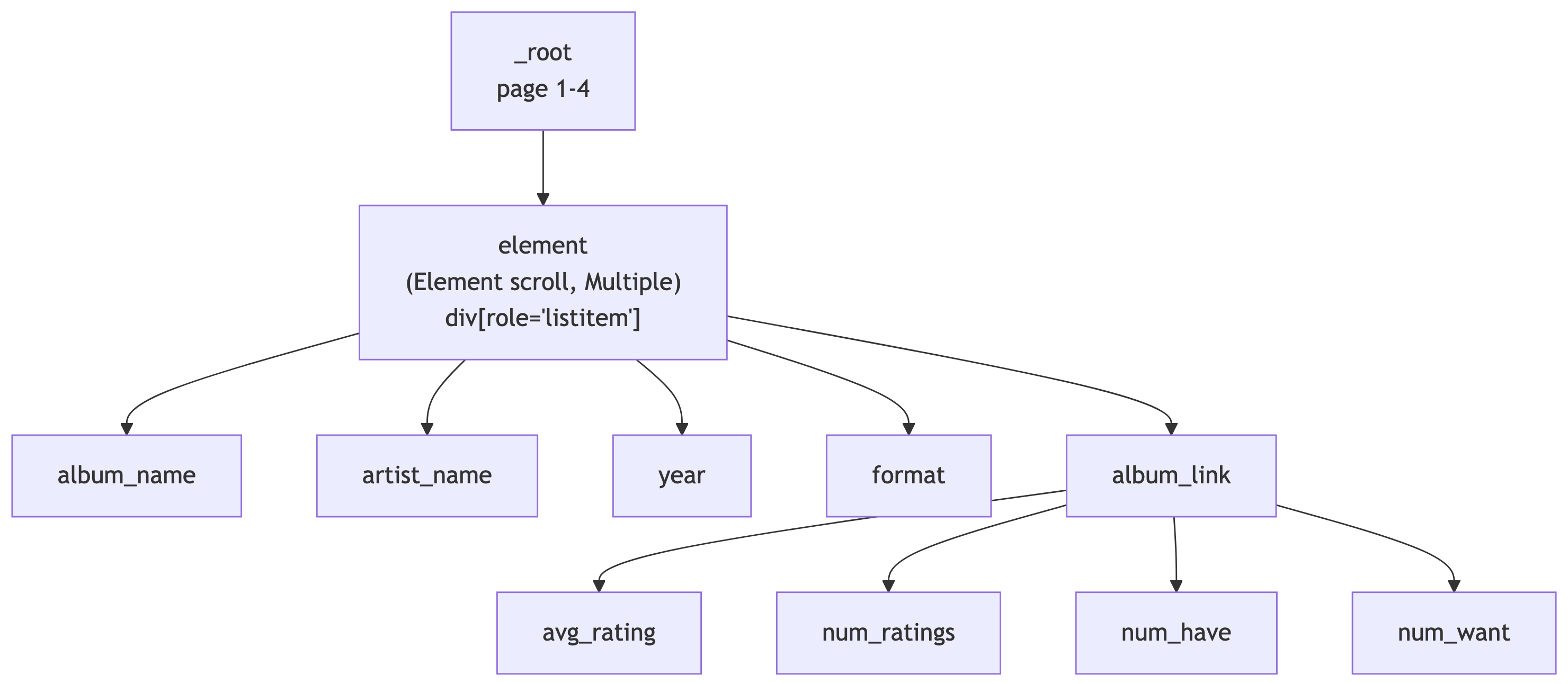
The solution sitemap JSON is available as top100_2010-2020.json on the course site.
| Selector ID | Type | Parent | CSS Selector |
|---|---|---|---|
element |
Element scroll | _root |
div[role='listitem'] |
album_name |
Text | element |
a.line-clamp-2 |
artist_name |
Text | element |
a.block |
year |
Text | element |
span.block.text-xs |
format |
Text | element |
p.text-xs.truncate |
album_link |
Link | element |
a.group |
avg_rating |
Text | album_link |
.section_Odw8o div div ul:nth-of-type(1) span:nth-of-type(2) |
num_ratings |
Text | album_link |
#release-stats li:nth-of-type(4) a |
num_have |
Text | album_link |
#release-stats li:nth-of-type(1) a |
num_want |
Text | album_link |
#release-stats li:nth-of-type(2) a |