Lecture 10-2: Working with Dates and Times
DATA 503: Fundamentals of Data Engineering
March 16, 2026
Part 1: Setting Up
Before we start manipulating time itself, we need to load some data.
Loading the Chapter Database
Step 1: Create the Database
Create a fresh database for this lecture:
Or use Beekeeper Studio / pgAdmin to create it through the GUI.
Step 2: Create and Load the Taxi Table
The NYC taxi trips table contains 368,774 metered trips from June 1, 2016:
CREATE TABLE nyc_yellow_taxi_trips (
    trip_id bigint GENERATED ALWAYS AS IDENTITY PRIMARY KEY,
    vendor_id text NOT NULL,
    tpep_pickup_datetime timestamptz NOT NULL,
    tpep_dropoff_datetime timestamptz NOT NULL,
    passenger_count integer NOT NULL,
    trip_distance numeric(8,2) NOT NULL,
    pickup_longitude numeric(18,15) NOT NULL,
    pickup_latitude numeric(18,15) NOT NULL,
    rate_code_id text NOT NULL,
    store_and_fwd_flag text NOT NULL,
    dropoff_longitude numeric(18,15) NOT NULL,
    dropoff_latitude numeric(18,15) NOT NULL,
    payment_type text NOT NULL,
    fare_amount numeric(9,2) NOT NULL,
    extra numeric(9,2) NOT NULL,
    mta_tax numeric(5,2) NOT NULL,
    tip_amount numeric(9,2) NOT NULL,
    tolls_amount numeric(9,2) NOT NULL,
    improvement_surcharge numeric(9,2) NOT NULL,
    total_amount numeric(9,2) NOT NULL
);
Step 3: Import the CSV
\copy nyc_yellow_taxi_trips (vendor_id, tpep_pickup_datetime,
    tpep_dropoff_datetime, passenger_count, trip_distance,
    pickup_longitude, pickup_latitude, rate_code_id,
    store_and_fwd_flag, dropoff_longitude, dropoff_latitude,
    payment_type, fare_amount, extra, mta_tax, tip_amount,
    tolls_amount, improvement_surcharge, total_amount)
FROM '/path/to/nyc_yellow_taxi_trips.csv'
WITH (FORMAT CSV, HEADER);
Replace /path/to/ with the actual path to the CSV file on your machine.
Step 4: Create an Index and Verify
Step 5: Set the Time Zone
The taxi data is from New York City:
This is a session-level setting. It changes how timestamps are displayed, not how they are stored. PostgreSQL always stores timestamptz as UTC internally.
Part 2: Date and Time Data Types
Time to talk about time.
The Four Types
PostgreSQL Date/Time Types
PostgreSQL gives us four data types for temporal data:
| Type | Stores | Example |
|---|---|---|
timestamptz |
Date + time + time zone | 2022-12-01 18:37:12 EST |
date |
Date only | 2022-12-01 |
time |
Time only | 18:37:12 |
interval |
A duration | 2 days 3 hours |
The first three are datetime types. The fourth, interval, represents a length of time rather than a specific moment.
Which One Should You Use?
Almost always: timestamptz.
A timestamp without a time zone is like a coordinate without a datum. Sure, “45.5, -122.6” means something, but in which reference system? NAD27? WGS84? The difference matters.
date is fine when you genuinely only care about the calendar date. time alone is almost never useful because a time without a date or zone is ambiguous.
interval shows up as the result of subtracting two timestamps. Think of it as the answer to “how long?” rather than “when?”
Why This Matters for Data Engineering
Think about your Railway scrapers. Each row has a created_at timestamp. If that column were timestamp instead of timestamptz, and your Railway instance moved to a different region, your time-series data would silently break. Every record would look like it shifted by hours.
This is not hypothetical. It is one of the most common data pipeline bugs in production systems.
One moment in time, stored once, displayed correctly everywhere. That is the entire point of timestamptz.
Try It: Pick the Type
What data type would you use for each of these?
- When a scraper pulled data from an API
- A person’s date of birth
- How long an ETL job took to run
- The daily closing time of a store
Answers:
timestamptz(you need to know which time zone the server was in)date(nobody was born at 3:47 PM UTC)interval(e.g.,'2 hours 23 minutes')- Trick question.
timeseems right, but without a date, you cannot handle daylight saving changes. In practice, store this as text or use application logic.
Part 3: Extracting Date and Time Components
Sometimes you do not need the whole timestamp. You just want the year, or the hour, or the day of the week.
date_part() and extract()
Pulling Apart a Timestamp
The date_part() function extracts a single component:
SELECT
    date_part('year',   '2022-12-01 18:37:12 EST'::timestamptz) AS year,
    date_part('month',  '2022-12-01 18:37:12 EST'::timestamptz) AS month,
    date_part('day',    '2022-12-01 18:37:12 EST'::timestamptz) AS day,
    date_part('hour',   '2022-12-01 18:37:12 EST'::timestamptz) AS hour,
    date_part('minute', '2022-12-01 18:37:12 EST'::timestamptz) AS minute,
    date_part('seconds','2022-12-01 18:37:12 EST'::timestamptz) AS seconds;
Run this now. Your hour value might differ from your neighbor’s. Why?
Because PostgreSQL converts the timestamp to your session time zone. EST is UTC-5. If your server is set to Pacific time (UTC-8), the hour shows as 15 instead of 18. The underlying moment is identical.
More Components
| Component | What It Returns |
|---|---|
timezone_hour |
UTC offset in hours (e.g., -5 for EST) |
week |
ISO 8601 week number (1-53) |
quarter |
Quarter of the year (1-4) |
epoch |
Seconds since January 1, 1970 00:00:00 UTC |
Epoch is how computers think about time. Every timestamp is just a big number counting seconds from 1970. Remember the OpenSky API? The time field in your flight data was an epoch value. Now you know how to work with them.
The SQL Standard Alternative: extract()
extract() does the same thing with slightly different syntax:
No quotes around the component name, and FROM instead of a comma. Both functions return the same result. Use whichever your team prefers.
Try It: Your Turn
Write a query that extracts the day of the week (dow) and the hour from the current timestamp.
Hint: date_part('dow', ...) returns 0 for Sunday through 6 for Saturday.
date_trunc(): Rounding Timestamps
Truncating to a Precision
While date_part() pulls out a component, date_trunc() rounds a timestamp down to a specified precision:
| Precision | Result |
|---|---|
year |
2022-01-01 00:00:00-05 |
month |
2022-12-01 00:00:00-05 |
day |
2022-12-01 00:00:00-05 |
hour |
2022-12-01 18:00:00-05 |
This is essential for time-series aggregation. Want daily totals? GROUP BY date_trunc('day', timestamp_col). Hourly rollups? GROUP BY date_trunc('hour', timestamp_col).
In data pipelines, date_trunc is how you build time-bucketed summary tables and partition data by date ranges.
Part 4: Creating Dates and Times
Sometimes your data arrives in pieces. PostgreSQL can reassemble them.
Making Datetimes
Building from Components
Run the make_timestamptz query. If your session is in US/Eastern, you should see 2022-02-22 13:04:30.3-05. Lisbon is UTC+0, Eastern in February is UTC-5, so 6:04 PM Lisbon = 1:04 PM New York.
Getting the Current Date and Time
All of these return the time at the start of the transaction. If your query takes 10 seconds, every row gets the same timestamp.
current_timestamp vs. clock_timestamp()
What if you want the actual clock time as each row is processed?
CREATE TABLE current_time_example (
    time_id integer GENERATED ALWAYS AS IDENTITY,
    current_timestamp_col timestamptz,
    clock_timestamp_col timestamptz
);

INSERT INTO current_time_example
            (current_timestamp_col, clock_timestamp_col)
    (SELECT current_timestamp,
            clock_timestamp()
     FROM generate_series(1,1000));

SELECT * FROM current_time_example;
The current_timestamp_col is identical for all 1,000 rows. The clock_timestamp_col increases slightly with each row.
When would this matter? Imagine logging the exact processing time of each row during a large ETL load. current_timestamp would give you one timestamp for the entire batch. clock_timestamp() gives you per-row precision. This is how you measure row-level throughput in a pipeline.
Part 5: Time Zones
This is where dates and times get spicy.
Understanding Time Zones
Why Time Zones Matter
A server in Oregon logs an event at 2026-03-15 14:00:00. A server in New York logs an event at 2026-03-15 17:00:00. Which happened first?
They happened at the exact same moment. Oregon is UTC-7, New York is UTC-4. Both are 21:00 UTC.
Without time zone information, you would think the Oregon event happened 3 hours earlier. In a distributed pipeline where data flows through servers in multiple regions, this creates silent data corruption.
Checking Your Time Zone
If you followed setup, it should say US/Eastern.
Browsing Available Time Zones
Try It: Find a Time Zone
Write a query to find all time zones in Asia. How many are there?
Changing and Converting Time Zones
SET TIME ZONE
Change your session’s display time zone:
This changes how timestamps are displayed, not how they are stored. Internally, PostgreSQL always stores timestamptz values as UTC.
The Great Demonstration
Watch the same moment change its display:
CREATE TABLE time_zone_test (
    test_date timestamptz
);

INSERT INTO time_zone_test VALUES ('2023-01-01 4:00');

SET TIME ZONE 'US/Pacific';
SELECT test_date FROM time_zone_test;
-- Shows: 2023-01-01 04:00:00-08

SET TIME ZONE 'US/Eastern';
SELECT test_date FROM time_zone_test;
-- Shows: 2023-01-01 07:00:00-05
Same row, same data on disk, different display. This is why timestamptz is the right default.
AT TIME ZONE: One-Off Conversions
Peek at a value in a different time zone without changing your session:
4 AM Pacific on January 1st is 9 PM the same day in Seoul.
Quirk alert: When you use AT TIME ZONE on a timestamptz, the output becomes a timestamp without time zone. PostgreSQL strips the zone because you already specified which one you want.
Try It: World Clocks
It is midnight on New Year’s Day 2030 in New York ('2030-01-01 00:00:00 US/Eastern').
Write a query showing what time it is at that moment in London, Tokyo, and Sydney.
London: 5 AM. Tokyo: 2 PM. Sydney: 4 PM.
Time Zones in Data Pipelines
The Pipeline Time Zone Problem
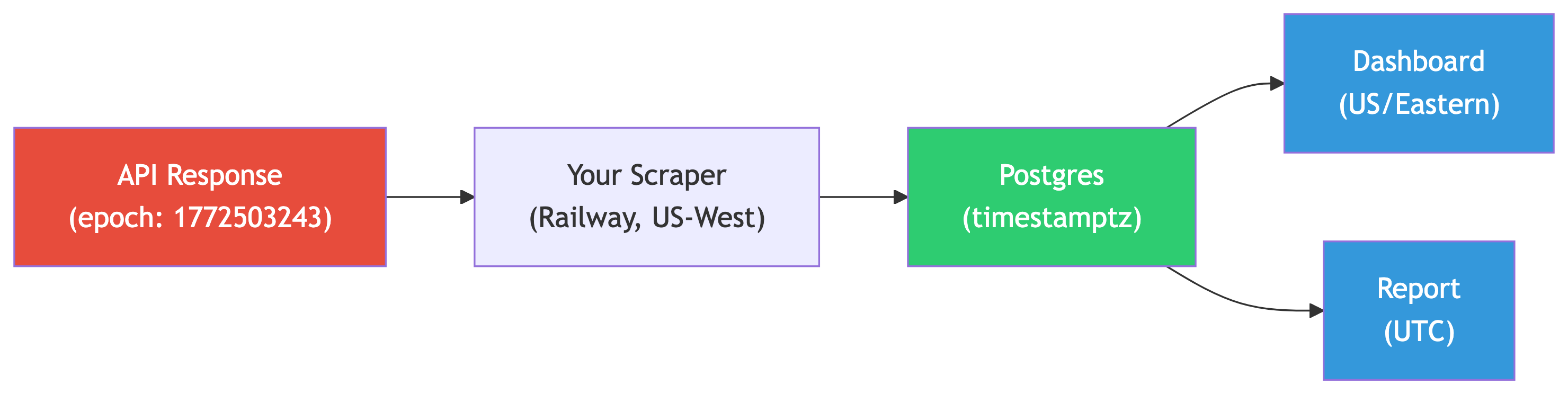
Consider your Railway scrapers. The API returns Unix epoch timestamps (UTC). Your Railway Postgres might be in US/West. Your local Postgres for analysis might be in US/Pacific.

If every column uses timestamptz, this chain works seamlessly. PostgreSQL handles the conversions. If any column uses plain timestamp, you get silent drift.
Best Practices for Timestamps in Pipelines
- Always use
timestamptzfor storage - Store raw epoch values alongside human-readable timestamps when ingesting API data
- Set session time zone explicitly at the start of every script
- Convert at the display layer, not at the storage layer
- Document your convention in your pipeline README
Part 6: Date and Time Math
You can do arithmetic with dates and times, and it actually makes sense.
Calculations with Dates
Subtracting Dates
Subtract one date from another and you get an integer (days between them):
Result: 3. Three days between September 27 and September 30, 1929.
Adding Intervals
Add an interval to a date:
Result: 1934-09-30 00:00:00. PostgreSQL handles leap years, month lengths, and calendar quirks automatically.
Subtracting Timestamps
Subtract two timestamps and you get an interval:
Result: 08:00:00.
Getting Duration in Specific Units
When you need duration as a number (not an interval), extract the epoch:
Result: 8. This pattern – subtract timestamps, extract epoch, divide – is how you compute durations in minutes, hours, or days as plain numbers. Essential for aggregations and comparisons.
Try It: How Old Is PostgreSQL?
PostgreSQL’s first release was on July 8, 1996. Write a query calculating how many days ago that was.
Part 7: NYC Taxi Trip Analysis
Time to put all of this to work on real data. We have 368,774 taxi rides from June 1, 2016, in New York City.
Patterns in Pickup Times
The Busiest Hours
When do New Yorkers take the most taxi rides?
Run this now. You should get 24 rows.
The busiest hours are in the evening (6 PM to 10 PM). The slowest are early morning (2 AM to 5 AM). The evening peak reflects commutes and nightlife on a summer Wednesday.
Try It: Busiest Hour
Write a query to find the single busiest hour and its trip count.
Trip Duration Analysis
Median Trip Time by Hour
How long do taxi rides take at different times of day?
The longest median trips are around midday (~15 minutes at 1 PM). The shortest are early morning (~8 minutes at 5 AM). Traffic matters.
Try It: The Longest Rides
Find the 10 longest taxi rides by duration. Include pickup time, dropoff time, calculated duration, and trip distance.
Do any results look suspicious?
You will see rides lasting 20+ hours with zero distance. Data quality issues. The meter was left running, or timestamps were recorded incorrectly.
This is why data engineers never trust raw data. Always profile. Always validate.
Try It: Average Fare by Hour
Write a query showing the average total_amount for each hour. Which hour has the highest average fare?
Early morning hours (4-5 AM) have the highest average fares. Fewer but longer rides – airport runs and long distances with no traffic.
Time-Series Aggregation with date_trunc
Hourly Rollups
In data engineering, you frequently need to aggregate time-series data into fixed buckets. This is the basis of every dashboard and monitoring system.
Unlike date_part('hour', ...) which gives you just the number 0-23, date_trunc preserves the full timestamp truncated to the hour. This matters when you have multi-day data – hour 14 on Monday is different from hour 14 on Tuesday.
Try It: Daily Revenue
Write a query using date_trunc to calculate total daily revenue (total_amount). Since this dataset is one day, you should get a single row.
Generating Time Series with generate_series
Filling in Missing Time Slots
Real-world time-series data has gaps. If no trips happened at 3:17 AM, that minute is simply absent from your results. Dashboards hate gaps. Pipeline consumers hate gaps.
generate_series creates a continuous sequence of timestamps:
This produces 24 rows, one for each hour, regardless of whether any trips happened.
Joining with Generated Series
To get a complete hourly report (with zeros for empty hours):
WITH hours AS (
    SELECT generate_series(
        '2016-06-01 00:00:00 US/Eastern'::timestamptz,
        '2016-06-01 23:00:00 US/Eastern'::timestamptz,
        '1 hour'::interval
    ) AS hour_slot
)
SELECT
    h.hour_slot,
    coalesce(count(t.trip_id), 0) AS trip_count
FROM hours h
LEFT JOIN nyc_yellow_taxi_trips t
    ON date_trunc('hour', t.tpep_pickup_datetime) = h.hour_slot
GROUP BY h.hour_slot
ORDER BY h.hour_slot;
This pattern – generate a time spine, left join your data – is fundamental to building reliable time-series reports. You will see it in every analytics platform.
Part 8: Amtrak Train Trips
Let us switch from taxis to trains and watch timestamps cross time zones.
Building the Train Data
Creating and Loading the Table
CREATE TABLE train_rides (
    trip_id bigint GENERATED ALWAYS AS IDENTITY PRIMARY KEY,
    segment text NOT NULL,
    departure timestamptz NOT NULL,
    arrival timestamptz NOT NULL
);

INSERT INTO train_rides (segment, departure, arrival)
VALUES
    ('Chicago to New York',
        '2020-11-13 21:30 CST', '2020-11-14 18:23 EST'),
    ('New York to New Orleans',
        '2020-11-15 14:15 EST', '2020-11-16 19:32 CST'),
    ('New Orleans to Los Angeles',
        '2020-11-17 13:45 CST', '2020-11-18 9:00 PST'),
    ('Los Angeles to San Francisco',
        '2020-11-19 10:10 PST', '2020-11-19 21:24 PST'),
    ('San Francisco to Denver',
        '2020-11-20 9:10 PST',  '2020-11-21 18:38 MST'),
    ('Denver to Chicago',
        '2020-11-22 19:10 MST', '2020-11-23 14:50 CST');
Notice how each timestamp includes the time zone of the city. The subtraction handles cross-zone arithmetic automatically because we used timestamptz.
Calculating Trip Durations
Segment Duration
Two things to notice:
to_char()formats timestamps into human-readable strings- Subtracting timestamps gives intervals. PostgreSQL correctly handles the time zone differences across segments
Try It: Longest Segment
Which segment takes the longest?
Cumulative Trip Duration
Running Total with Window Functions
How long has the entire trip taken after each segment?
The output shows things like 2 days 85:47:00. PostgreSQL sums the days and hours separately without rolling up.
Fixing with justify_interval()
Now the final row shows 5 days 13:47:00. Five and a half days coast to coast by train.
Try It: Format the Output
Rewrite the query with the departure formatted as Mon DD, YYYY HH12:MI AM TZ using to_char().
Part 9: CTEs and Useful PostgreSQL Features
Complex temporal queries get messy fast. CTEs and a few other PostgreSQL features make them manageable.
Common Table Expressions (CTEs)
What Is a CTE?
A Common Table Expression (CTE) is a temporary, named result set defined with WITH that exists only for the duration of a single query. Think of it as a named intermediate table.
The WITH clause defines hourly_stats. The main query references it like a table. When the query finishes, hourly_stats disappears.
CTEs vs. Subqueries
The equivalent subquery version:
Same result. But CTEs are:
- More readable. Logic flows top-to-bottom, not inside-out.
- Reusable. Reference the same CTE multiple times in one query.
- Chainable. Multiple CTEs can build on each other.
- Self-documenting. Good CTE names describe the data at each stage.
In data engineering, CTEs mirror the stages of a transformation pipeline. Each CTE is a logical step: extract, clean, aggregate, enrich.
Chaining CTEs: The Pipeline Pattern
You can define multiple CTEs separated by commas. Each one can reference the ones before it:
WITH hourly AS (
    -- Stage 1: Aggregate by hour
    SELECT
        date_part('hour', tpep_pickup_datetime) AS trip_hour,
        count(*) AS num_trips,
        round(avg(total_amount), 2) AS avg_fare,
        round(avg(trip_distance), 2) AS avg_distance
    FROM nyc_yellow_taxi_trips
    GROUP BY trip_hour
),
ranked AS (
    -- Stage 2: Rank hours by popularity
    SELECT
        trip_hour,
        num_trips,
        avg_fare,
        avg_distance,
        rank() OVER (ORDER BY num_trips DESC) AS popularity_rank
    FROM hourly
)
-- Stage 3: Filter to top 5
SELECT *
FROM ranked
WHERE popularity_rank <= 5
ORDER BY popularity_rank;
Each CTE is simple. The chain is complex. This is the same principle behind well-designed ETL: small, testable, composable transformations.
Try It: Busiest vs. Quietest Hours
Using a CTE, find the 3 busiest and 3 quietest hours by trip count. Combine them into one result with UNION ALL.
WITH hourly AS (
    SELECT
        date_part('hour', tpep_pickup_datetime) AS trip_hour,
        count(*) AS num_trips
    FROM nyc_yellow_taxi_trips
    GROUP BY trip_hour
)
(SELECT trip_hour, num_trips, 'Busiest' AS category
 FROM hourly ORDER BY num_trips DESC LIMIT 3)
UNION ALL
(SELECT trip_hour, num_trips, 'Quietest' AS category
 FROM hourly ORDER BY num_trips ASC LIMIT 3)
ORDER BY category, num_trips DESC;
The CTE is defined once, used twice. Without it, the GROUP BY aggregation would be duplicated in both halves of the UNION ALL.
Useful PostgreSQL Features
COALESCE: Handling NULLs
COALESCE returns the first non-NULL value from its arguments:
This is critical when combining generate_series with LEFT JOIN. Hours with no trips produce NULL counts, and COALESCE(count, 0) fills the gaps with zeros. In pipeline code, you will use COALESCE constantly – any time you join tables that might not match every row.
HAVING: Filtering After Aggregation
WHERE filters rows before grouping. HAVING filters groups after aggregation:
This returns only hours with more than 15,000 trips. The count does not exist until after GROUP BY runs, so WHERE cannot filter on it.
FILTER: Conditional Aggregation (PostgreSQL-Specific)
The FILTER clause lets you apply a condition to a specific aggregate without affecting others in the same query:
SELECT
    date_part('hour', tpep_pickup_datetime) AS trip_hour,
    count(*) AS total_trips,
    count(*) FILTER (WHERE payment_type = '1') AS credit_trips,
    count(*) FILTER (WHERE payment_type = '2') AS cash_trips,
    round(
        count(*) FILTER (WHERE payment_type = '1')::numeric
        / count(*)::numeric * 100, 1
    ) AS credit_pct
FROM nyc_yellow_taxi_trips
GROUP BY trip_hour
ORDER BY trip_hour;
Without FILTER, you would need SUM(CASE WHEN ... THEN 1 ELSE 0 END) for each conditional count. FILTER is cleaner. It is PostgreSQL-specific (not in the SQL standard), but most modern databases have equivalents.
Try It: Tipping Patterns by Hour
Using FILTER, write a query that shows for each hour: the total number of trips, the number of trips that included a tip (tip_amount > 0), and the tipping percentage. Which hours have the highest tipping rates?
SELECT
    date_part('hour', tpep_pickup_datetime) AS trip_hour,
    count(*) AS total_trips,
    count(*) FILTER (WHERE tip_amount > 0) AS tipped_trips,
    round(
        count(*) FILTER (WHERE tip_amount > 0)::numeric
        / count(*)::numeric * 100, 1
    ) AS tip_pct
FROM nyc_yellow_taxi_trips
GROUP BY trip_hour
ORDER BY tip_pct DESC;
CTE + Date Functions: A Real Pattern
Combining CTEs with temporal analysis is where things get powerful. Here we compute each hour’s trip count, then compare it to the overall average:
WITH hourly_counts AS (
    SELECT
        date_part('hour', tpep_pickup_datetime) AS trip_hour,
        count(*) AS num_trips
    FROM nyc_yellow_taxi_trips
    GROUP BY trip_hour
),
overall AS (
    SELECT round(avg(num_trips), 0) AS avg_hourly_trips
    FROM hourly_counts
)
SELECT
    h.trip_hour,
    h.num_trips,
    o.avg_hourly_trips,
    CASE
        WHEN h.num_trips > o.avg_hourly_trips THEN 'Above Average'
        WHEN h.num_trips < o.avg_hourly_trips THEN 'Below Average'
        ELSE 'Average'
    END AS comparison
FROM hourly_counts h
CROSS JOIN overall o
ORDER BY h.trip_hour;
CTE 1 aggregates by hour. CTE 2 computes the average across all hours. The main query joins them with CROSS JOIN (since overall is a single row) and classifies each hour.
This pattern – aggregate, compute a benchmark, compare – is the backbone of anomaly detection in data pipelines. Is this hour’s traffic normal? Is this day’s revenue within expected range? Same structure, different data.
Try It: Revenue Anomaly Detection
Using two CTEs, find the hours where total revenue is more than one standard deviation above or below the hourly average. Show the hour, its revenue, the average, the standard deviation, and label each as ‘High’, ‘Low’, or ‘Normal’.
Hint: use stddev() alongside avg() in the second CTE.
WITH hourly_revenue AS (
    SELECT
        date_part('hour', tpep_pickup_datetime) AS trip_hour,
        round(sum(total_amount), 2) AS hour_revenue
    FROM nyc_yellow_taxi_trips
    GROUP BY trip_hour
),
stats AS (
    SELECT
        round(avg(hour_revenue), 2) AS avg_revenue,
        round(stddev(hour_revenue), 2) AS stddev_revenue
    FROM hourly_revenue
)
SELECT
    h.trip_hour,
    h.hour_revenue,
    s.avg_revenue,
    s.stddev_revenue,
    CASE
        WHEN h.hour_revenue > s.avg_revenue + s.stddev_revenue THEN 'High'
        WHEN h.hour_revenue < s.avg_revenue - s.stddev_revenue THEN 'Low'
        ELSE 'Normal'
    END AS anomaly_label
FROM hourly_revenue h
CROSS JOIN stats s
ORDER BY h.trip_hour;
Part 10: Putting It All Together (Exercises)
Let’s combine several concepts from today into more complex queries.
Combined Exercises
Try It: Taxi Trips by Day of Week
Count trips by day of the week using a CASE statement for day names:
SET TIME ZONE 'US/Eastern';

SELECT
    CASE date_part('dow', tpep_pickup_datetime)
        WHEN 0 THEN 'Sunday'
        WHEN 1 THEN 'Monday'
        WHEN 2 THEN 'Tuesday'
        WHEN 3 THEN 'Wednesday'
        WHEN 4 THEN 'Thursday'
        WHEN 5 THEN 'Friday'
        WHEN 6 THEN 'Saturday'
    END AS day_name,
    count(*) AS num_trips
FROM nyc_yellow_taxi_trips
GROUP BY day_name
ORDER BY num_trips DESC;
Since this dataset is from June 1, 2016 (a Wednesday), only one row appears. But the pattern works on multi-day datasets.
Try It: Time Zone Conversion
Show the first 5 taxi pickup times converted to Asia/Tokyo time.
Try It: Trip Duration Percentiles
Calculate the 25th, 50th (median), and 75th percentile of trip duration:
SELECT
    percentile_cont(0.25)
        WITHIN GROUP (ORDER BY tpep_dropoff_datetime - tpep_pickup_datetime)
        AS p25,
    percentile_cont(0.50)
        WITHIN GROUP (ORDER BY tpep_dropoff_datetime - tpep_pickup_datetime)
        AS median,
    percentile_cont(0.75)
        WITHIN GROUP (ORDER BY tpep_dropoff_datetime - tpep_pickup_datetime)
        AS p75
FROM nyc_yellow_taxi_trips;
The IQR (P75 - P25) tells you how spread out typical trips are.
Try It: Correlation Challenge
Calculate the correlation coefficient between trip duration (in seconds) and total_amount. Then do the same for trip_distance and total_amount. Limit to rides of 3 hours or less.
Which is a better predictor of fare: time or distance?
SELECT
    round(
        corr(
            date_part('epoch', tpep_dropoff_datetime - tpep_pickup_datetime),
            total_amount
        )::numeric, 4
    ) AS duration_fare_corr,
    round(
        corr(trip_distance, total_amount)::numeric, 4
    ) AS distance_fare_corr
FROM nyc_yellow_taxi_trips
WHERE tpep_dropoff_datetime - tpep_pickup_datetime <= '3 hours'::interval;
Distance correlates more strongly with fare. NYC taxi meters are primarily distance-based.
Part 11: What We Learned
Summary
Key Concepts
| Concept | What It Does |
|---|---|
timestamptz |
The go-to type for storing moments in time |
date_part() / extract() |
Pull year, month, hour, etc. from a timestamp |
date_trunc() |
Round timestamps down to a precision (essential for time-series) |
make_timestamptz() |
Build timestamps from components |
current_timestamp / now() |
Time when the query started |
clock_timestamp() |
Actual clock time (changes per row) |
SET TIME ZONE |
Change display for your session |
AT TIME ZONE |
One-off conversion to another zone |
to_char() |
Format timestamps as readable strings |
justify_interval() |
Clean up messy interval output |
generate_series() |
Create continuous time spines for gap-free reporting |
WITH (CTE) |
Define named temporary result sets; mirrors pipeline stages |
COALESCE |
Return the first non-NULL value (essential for outer joins) |
HAVING |
Filter groups after aggregation |
FILTER (WHERE ...) |
Apply conditions to individual aggregates (PostgreSQL-specific) |
The Big Ideas
- Always use
timestamptz. A timestamp without a zone is a bug waiting to happen. - Time zones change the display, not the data. PostgreSQL stores everything as UTC.
- Subtracting timestamps gives you intervals. That is how you calculate durations.
- CTEs mirror pipeline stages. Each CTE is a named, testable transformation step.
date_truncis your best friend for time-series aggregation in pipelines.- Generate time spines with
generate_seriesto fill gaps in your data. - Use
FILTERfor conditional aggregation. Cleaner thanSUM(CASE ...)when you need multiple conditional counts or sums. - Real-world data is messy. Always sanity-check your results.
References
- DeBarros, A. (2022). Practical SQL: A Beginner’s Guide to Storytelling with Data (2nd ed.). No Starch Press. Chapter 12.
- PostgreSQL Date/Time Functions: https://www.postgresql.org/docs/current/functions-datetime.html
- PostgreSQL Formatting Functions: https://www.postgresql.org/docs/current/functions-formatting.html
- NYC TLC Trip Record Data: https://www.nyc.gov/site/tlc/about/tlc-trip-record-data.page
- ISO 8601 Date and Time Standard: https://en.wikipedia.org/wiki/ISO_8601